> ## Documentation Index
> Fetch the complete documentation index at: https://docs-docflow.textin.com/llms.txt
> Use this file to discover all available pages before exploring further.
# 费用报销场景(已有工作空间)
> 当已在docflow产品页完成工作空间创建、文件类别和审核规则库配置,通过 DocFlow API 完成文件上传,获取文件分类、抽取及智能审核结果的处理流程如下
本文面向**已完成**工作空间创建、文件类别配置和审核规则库设置的用户,演示如何在现有配置基础上,通过 API 完成日常的文件上传、字段抽取和智能审核流程。
如果您还没有配置过 DocFlow,请先阅读 [费用报销场景(从零开始)](./expense_reimbursement)。
## 01 场景说明
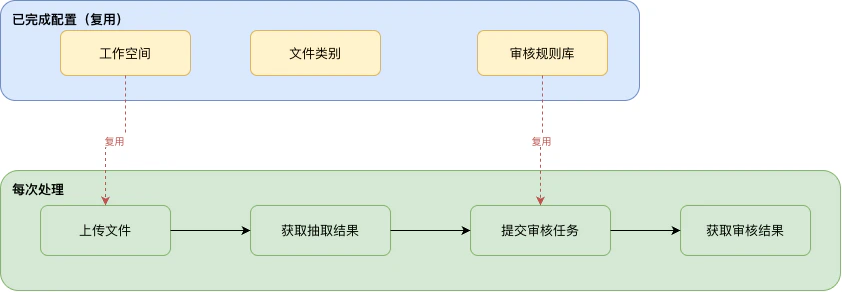
工作空间、文件类别、审核规则库属于**一次性基础配置**,完成后即可持续复用。在日常业务中,企业研发人员只需通过 API 重复以下三步:
1. **上传文件**:将新的报销单据上传至工作空间
2. **获取抽取结果**:等待系统完成分类识别与字段抽取,获取结构化数据
3. **智能审核**:绑定已有规则库,提交审核任务并获取审核结论
本文演示的完整流程如下图所示:
 ## 02 先决条件
在运行本文代码之前,您需要准备:
1. **认证信息**:从 [TextIn 控制台](https://www.textin.com/console/dashboard/setting) 获取 `x-ti-app-id` 和 `x-ti-secret-code`
2. **workspace\_id**:已创建的工作空间 ID(查看方式见下方)
3. **repo\_id**:已配置的审核规则库 ID(查看方式见下方)
4. **待处理文件**:本次需要处理的报销单据,例如报销申请单、酒店水单、支付记录等
### 如何获取 workspace\_id
**第一步**:在左侧工作空间列表中,将鼠标悬停在目标空间名称上,点击出现的「空间信息」按钮。
## 02 先决条件
在运行本文代码之前,您需要准备:
1. **认证信息**:从 [TextIn 控制台](https://www.textin.com/console/dashboard/setting) 获取 `x-ti-app-id` 和 `x-ti-secret-code`
2. **workspace\_id**:已创建的工作空间 ID(查看方式见下方)
3. **repo\_id**:已配置的审核规则库 ID(查看方式见下方)
4. **待处理文件**:本次需要处理的报销单据,例如报销申请单、酒店水单、支付记录等
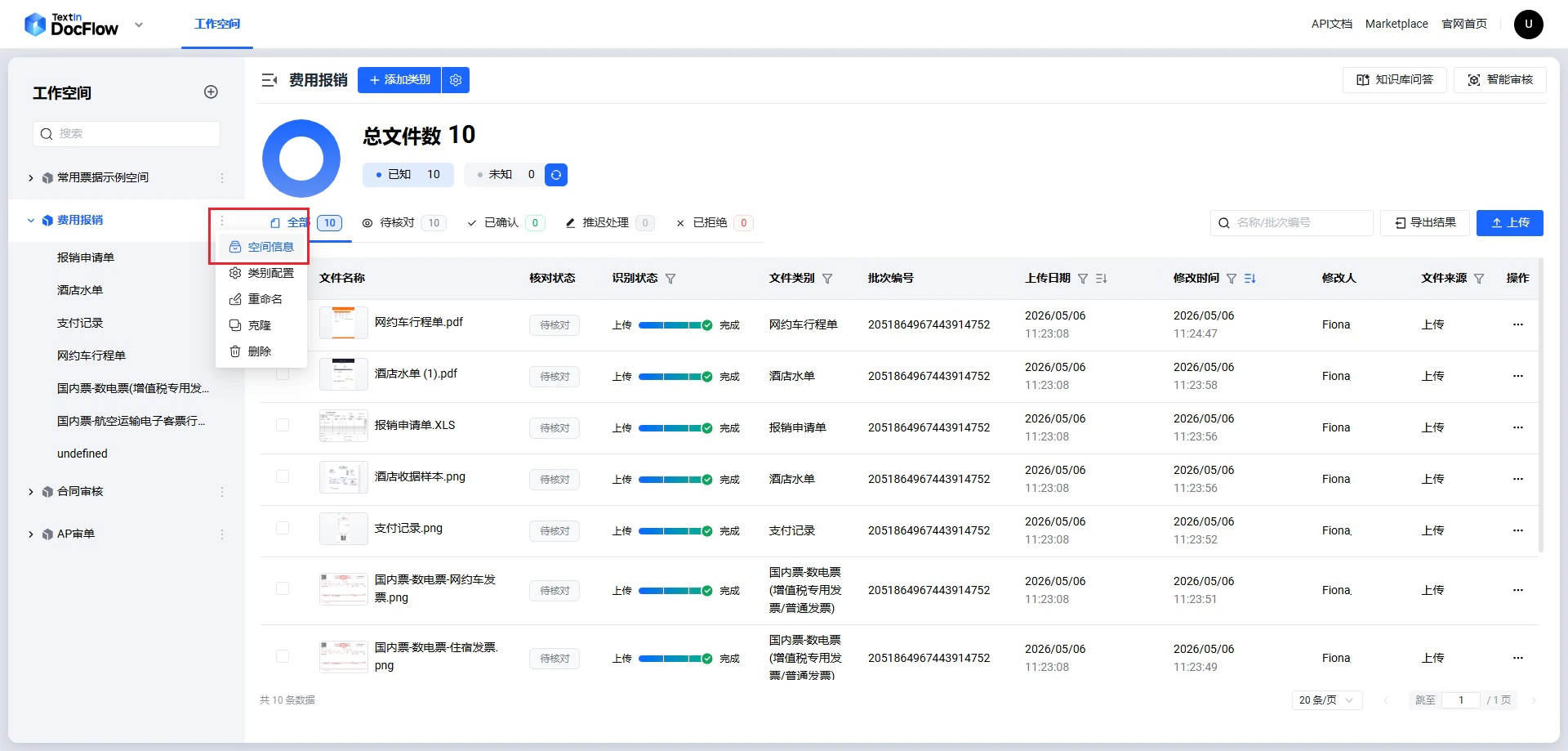
### 如何获取 workspace\_id
**第一步**:在左侧工作空间列表中,将鼠标悬停在目标空间名称上,点击出现的「空间信息」按钮。
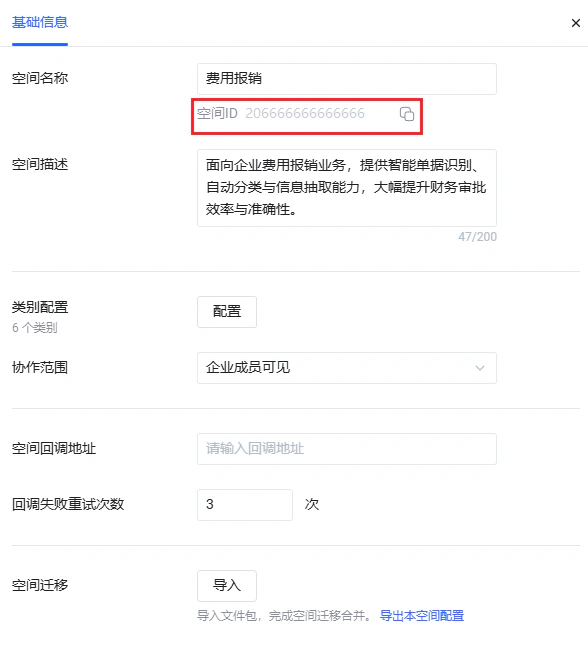
 **第二步**:进入空间的「基础信息」页,右侧「空间ID」字段即为 `workspace_id`,点击复制图标可直接复制。
 ### 如何获取 repo\_id
**第一步**:进入目标工作空间后,点击右上角「智能审核」按钮。
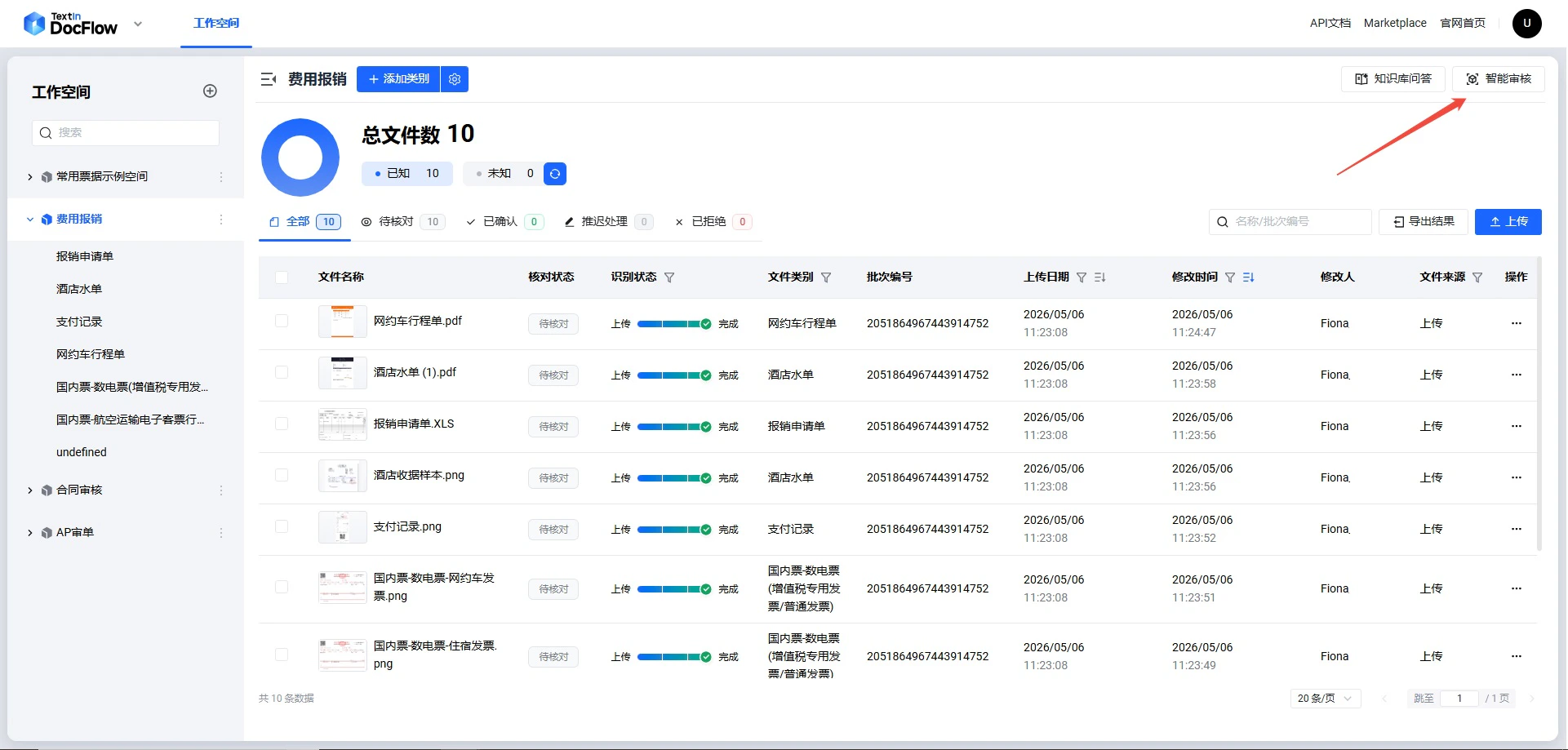
### 如何获取 repo\_id
**第一步**:进入目标工作空间后,点击右上角「智能审核」按钮。
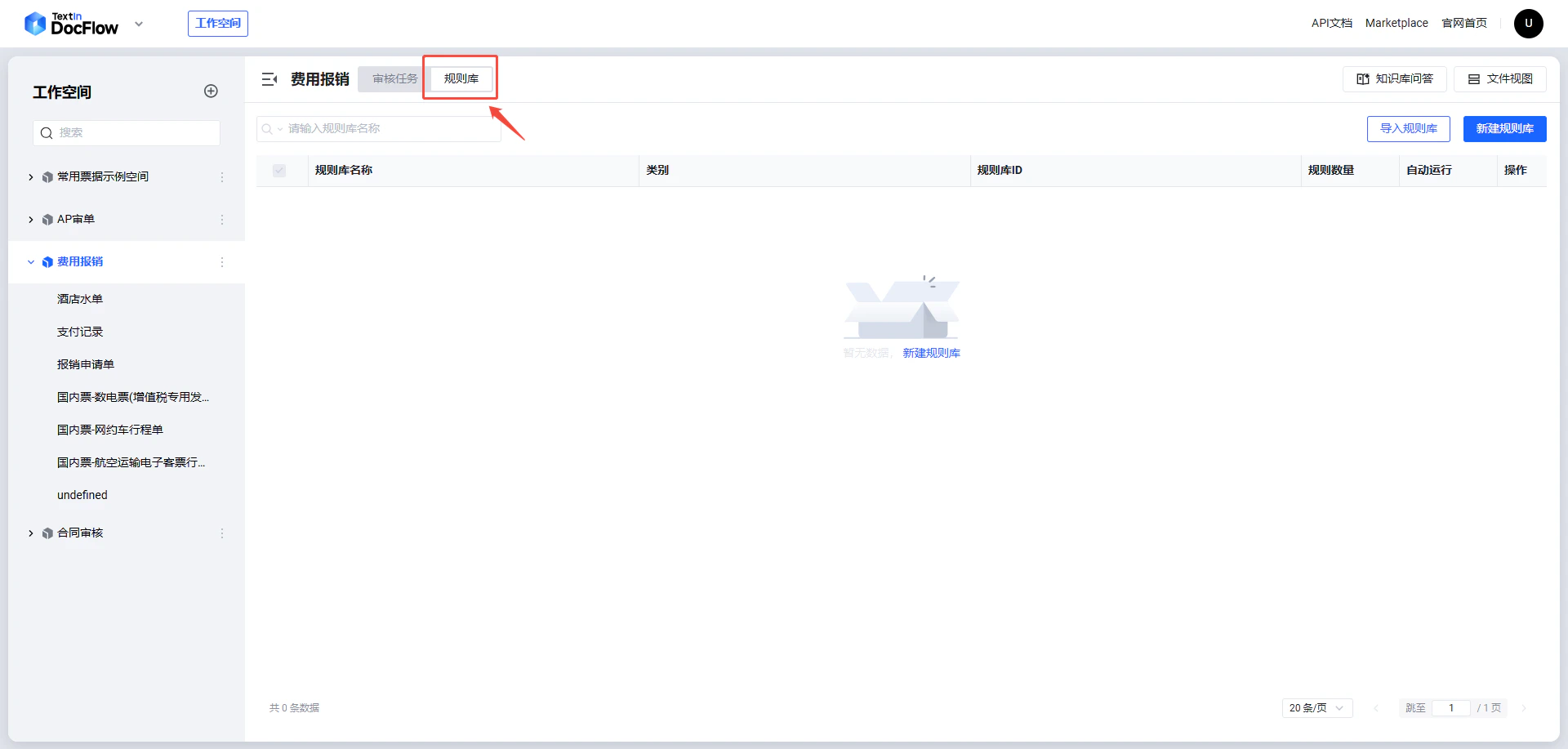
 **第二步**:在智能审核页面中,点击顶部「规则库」标签页。
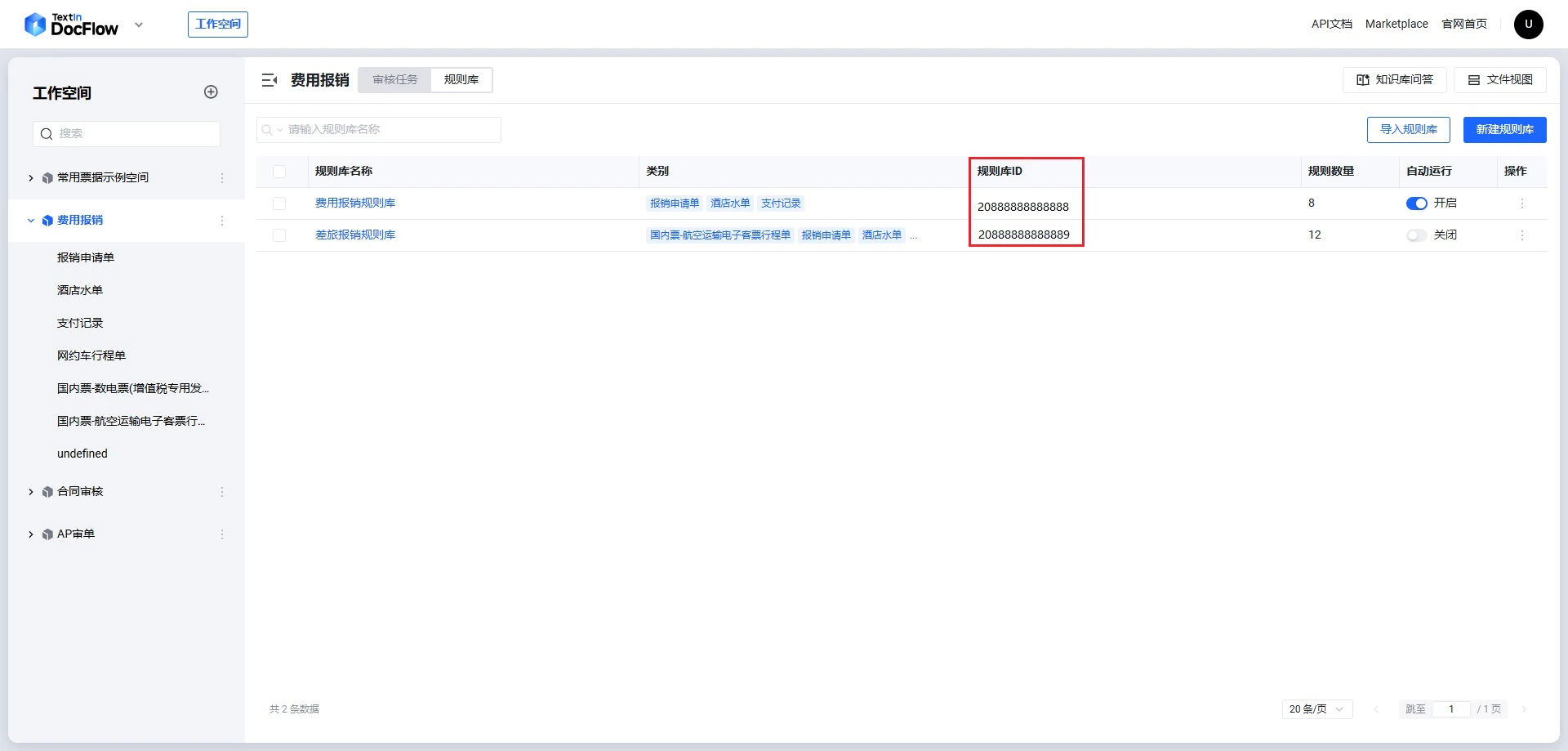
 **第三步**:规则库列表的「规则库ID」列即为 `repo_id`。
 ## 03 代码结构说明
本示例只包含日常处理所需的**三个步骤**,代码量比从零开始版本少约 60%。
### 两类函数
**REST API 调用函数** — 每个函数直接封装一个 API 端点:
| 函数(Python) | 方法(Java) | 对应 API 端点 | 说明 |
| -------------------- | ------------------ | -------------------------- | ------------------------------- |
| `upload_file` | `uploadFile` | `POST /file/upload` | 异步上传文件,返回 batch\_number,需轮询获取结果 |
| `upload_file_sync` | `uploadFileSync` | `POST /file/upload/sync` | 同步上传文件,直接返回抽取结果,无需轮询 |
| `submit_review_task` | `submitReviewTask` | `POST /review/task/submit` | 提交审核任务,返回审核 task\_id |
**工具辅助函数** — 提供公共基础能力或封装轮询/展示逻辑:
| 函数(Python) | 方法(Java) | 作用 |
| ----------------------- | --------------------- | -------------------------------- |
| `_headers` | `authHeaders` | 构造鉴权请求头 |
| `_check` | `checkResponse` | 校验响应 code,统一异常处理 |
| `_mime` | `mimeType` | 根据扩展名推断 MIME 类型 |
| `wait_for_result` | `waitForResult` | 循环轮询 `file/fetch`,等待抽取完成 |
| `display_result` | `displayResult` | 格式化打印抽取结果 |
| `wait_for_review` | `waitForReview` | 循环轮询 `review/task/result`,等待审核完成 |
| `display_review_result` | `displayReviewResult` | 格式化打印审核结果 |
### 逐步代码说明
DocFlow 提供两种上传模式:
* **异步上传**(`file/upload`):返回 `batch_number`,需配合步骤 2 轮询 `file/fetch` 获取抽取结果。适合批量上传后统一轮询的场景。
* **同步上传**(`file/upload/sync`):请求阻塞直到识别完成,直接返回抽取结果(结构与 `file/fetch` 一致),无需轮询,可跳过步骤 2。适合单文件实时处理场景。
#### 方式一:异步上传(需配合步骤 2 轮询)
```python theme={null}
def upload_file(workspace_id: str, file_path: str) -> str:
"""上传待处理文件至工作空间,返回 batch_number。"""
url = f"{BASE_URL}/api/app-api/sip/platform/v2/file/upload"
with open(file_path, "rb") as f:
resp = requests.post(url,
params={"workspace_id": workspace_id},
files={"file": (os.path.basename(file_path), f, _mime(file_path))},
headers=_headers(), timeout=60)
batch_number = _check(resp, "上传文件")["result"]["batch_number"]
print(f"[步骤1] 文件上传成功 name={os.path.basename(file_path)}"
f" batch_number={batch_number}")
return batch_number
# 调用示例:批量上传本次报销包的所有单据
file_paths = [
os.path.join(FILES_DIR, "sample_expense_form.xls"),
os.path.join(FILES_DIR, "sample_hotel_receipt.png"),
os.path.join(FILES_DIR, "sample_payment_record.pdf"),
]
batch_numbers = [upload_file(WORKSPACE_ID, p) for p in file_paths]
```
```java theme={null}
public static String uploadFile(String workspaceId, String filePath) throws IOException {
File file = new File(filePath);
HttpUrl url = HttpUrl.parse(BASE_URL + "/api/app-api/sip/platform/v2/file/upload")
.newBuilder().addQueryParameter("workspace_id", workspaceId).build();
MultipartBody body = new MultipartBody.Builder().setType(MultipartBody.FORM)
.addFormDataPart("file", file.getName(),
RequestBody.create(file, MediaType.get(mimeType(file.getName()))))
.build();
Request req = new Request.Builder().url(url).headers(authHeaders()).post(body).build();
try (Response resp = HTTP.newCall(req).execute()) {
String batchNumber = checkResponse(resp.body().string(), "上传文件")
.getAsJsonObject("result").get("batch_number").getAsString();
System.out.println("[步骤1] 文件上传成功 name=" + file.getName()
+ " batch_number=" + batchNumber);
return batchNumber;
}
}
// 调用示例:批量上传本次报销包的所有单据
String[] filePaths = {
FILES_DIR + "/sample_expense_form.xls",
FILES_DIR + "/sample_hotel_receipt.png",
FILES_DIR + "/sample_payment_record.pdf"
};
List batchNumbers = new ArrayList<>();
for (String path : filePaths) batchNumbers.add(uploadFile(WORKSPACE_ID, path));
```
#### 方式二:同步上传(直接返回抽取结果,跳过步骤 2)
```python theme={null}
def upload_file_sync(workspace_id: str, file_path: str) -> dict:
"""同步上传:直接返回抽取结果,无需轮询。"""
url = f"{BASE_URL}/api/app-api/sip/platform/v2/file/upload/sync"
with open(file_path, "rb") as f:
resp = requests.post(url,
params={"workspace_id": workspace_id},
files={"file": (os.path.basename(file_path), f, _mime(file_path))},
headers=_headers(), timeout=300)
data = _check(resp, "同步上传文件")
return data["result"]["files"][0] # 返回结构与 file/fetch 一致
# 调用示例:同步上传并直接获取抽取结果
raw_results = [upload_file_sync(WORKSPACE_ID, p) for p in file_paths]
```
```java theme={null}
public static JsonObject uploadFileSync(String workspaceId, String filePath) throws IOException {
File file = new File(filePath);
HttpUrl url = HttpUrl.parse(BASE_URL + "/api/app-api/sip/platform/v2/file/upload/sync")
.newBuilder().addQueryParameter("workspace_id", workspaceId).build();
MultipartBody body = new MultipartBody.Builder().setType(MultipartBody.FORM)
.addFormDataPart("file", file.getName(),
RequestBody.create(file, MediaType.get(mimeType(file.getName()))))
.build();
Request req = new Request.Builder().url(url).headers(authHeaders()).post(body).build();
try (Response resp = HTTP.newCall(req).execute()) {
return checkResponse(resp.body().string(), "同步上传文件")
.getAsJsonObject("result").getAsJsonArray("files")
.get(0).getAsJsonObject();
}
}
// 调用示例:同步上传并直接获取抽取结果
String[] filePaths = {
FILES_DIR + "/sample_expense_form.xls",
FILES_DIR + "/sample_hotel_receipt.png",
FILES_DIR + "/sample_payment_record.pdf"
};
List rawResults = new ArrayList<>();
for (String path : filePaths) rawResults.add(uploadFileSync(WORKSPACE_ID, path));
```
若步骤 1 使用了同步上传 `file/upload/sync`,则已直接获得抽取结果,可跳过本步骤。
`wait_for_result` 封装了轮询逻辑,每隔 3 秒查询一次 `file/fetch`,直到 `recognition_status` 变为 `1`(成功)。返回的文件对象中包含 `task_id`,后续审核步骤需要用到。
```python theme={null}
def wait_for_result(workspace_id: str, batch_number: str,
timeout: int = 120, interval: int = 3) -> dict:
"""轮询等待文件处理完成,返回含 task_id 的文件对象。"""
url = f"{BASE_URL}/api/app-api/sip/platform/v2/file/fetch"
deadline = time.time() + timeout
print(f"[步骤2] 等待处理结果(batch_number={batch_number})", end="", flush=True)
while time.time() < deadline:
resp = requests.get(url,
params={"workspace_id": workspace_id, "batch_number": batch_number},
headers=_headers(), timeout=30)
files = _check(resp, "获取处理结果").get("result", {}).get("files", [])
if files:
status = files[0].get("recognition_status")
if status == 1:
print(" 完成")
return files[0] # 含 task_id,供后续审核使用
elif status == 2:
raise RuntimeError(f"文件处理失败: {files[0].get('failure_causes')}")
print(".", end="", flush=True)
time.sleep(interval)
raise TimeoutError("等待超时")
# 调用示例(收集 task_id 用于后续审核)
raw_results = []
for batch_number in batch_numbers:
result = wait_for_result(WORKSPACE_ID, batch_number)
raw_results.append(result)
display_result(result) # 可选:打印抽取详情
```
```java theme={null}
public static JsonObject waitForResult(String workspaceId, String batchNumber,
int timeoutSec, int intervalSec) throws IOException, InterruptedException {
HttpUrl url = HttpUrl.parse(BASE_URL + "/api/app-api/sip/platform/v2/file/fetch")
.newBuilder().addQueryParameter("workspace_id", workspaceId)
.addQueryParameter("batch_number", batchNumber).build();
long deadline = System.currentTimeMillis() + (long) timeoutSec * 1000;
System.out.print("[步骤2] 等待处理结果(batch_number=" + batchNumber + ")");
while (System.currentTimeMillis() < deadline) {
Request req = new Request.Builder().url(url).headers(authHeaders()).get().build();
try (Response resp = HTTP.newCall(req).execute()) {
JsonObject data = checkResponse(resp.body().string(), "获取处理结果");
JsonArray files = data.getAsJsonObject("result").getAsJsonArray("files");
if (files != null && files.size() > 0) {
JsonObject file = files.get(0).getAsJsonObject();
int status = file.get("recognition_status").getAsInt();
if (status == 1) { System.out.println(" 完成"); return file; }
if (status == 2) throw new RuntimeException("文件处理失败");
}
}
System.out.print(".");
Thread.sleep((long) intervalSec * 1000);
}
throw new RuntimeException("等待超时");
}
// 调用示例
List rawResults = new ArrayList<>();
for (String bn : batchNumbers) {
JsonObject result = waitForResult(WORKSPACE_ID, bn, 120, 3);
rawResults.add(result);
displayResult(result); // 可选:打印抽取详情
}
```
`recognition_status` 取值含义:`0` = 处理中,`1` = 成功,`2` = 失败。文件较大或页数较多时处理时间可能更长,可适当增大 `timeout` 参数。
从步骤 2 的抽取结果中提取 `task_id`,传入审核接口,绑定已有规则库(`repo_id`)。审核任务是**异步执行**的,提交后需要轮询结果。
```python theme={null}
def submit_review_task(workspace_id: str, name: str,
repo_id: str, extract_task_ids: list) -> str:
"""提交审核任务,返回审核 task_id。"""
url = f"{BASE_URL}/api/app-api/sip/platform/v2/review/task/submit"
payload = {
"workspace_id": workspace_id,
"name": name,
"repo_id": repo_id,
"extract_task_ids": extract_task_ids,
}
resp = requests.post(url, json=payload, headers=_headers(), timeout=30)
task_id = _check(resp, "提交审核任务")["result"]["task_id"]
print(f"[步骤3] 审核任务提交成功 task_id={task_id}")
return task_id
def wait_for_review(workspace_id: str, task_id: str,
timeout: int = 300, interval: int = 5) -> dict:
"""轮询等待审核完成,返回审核结果。"""
url = f"{BASE_URL}/api/app-api/sip/platform/v2/review/task/result"
payload = {"workspace_id": workspace_id, "task_id": task_id}
deadline = time.time() + timeout
print(f"[步骤3] 等待审核结果(task_id={task_id})", end="", flush=True)
while time.time() < deadline:
resp = requests.post(url, json=payload, headers=_headers(), timeout=30)
result = _check(resp, "获取审核结果").get("result", {})
# 终态:1=审核通过,2=审核失败,4=审核不通过,7=识别失败
if result.get("status") in (1, 2, 4, 7):
print(" 完成")
return result
print(".", end="", flush=True)
time.sleep(interval)
raise TimeoutError("等待审核结果超时")
# 调用示例
task_name = f"费用报销审核_{datetime.now().strftime('%Y%m%d_%H%M%S')}"
extract_task_ids = [r.get("task_id") for r in raw_results if r.get("task_id")]
review_task_id = submit_review_task(WORKSPACE_ID, task_name, REPO_ID, extract_task_ids)
review_result = wait_for_review(WORKSPACE_ID, review_task_id)
display_review_result(review_result)
```
```java theme={null}
public static String submitReviewTask(String workspaceId, String name,
String repoId, List extractTaskIds) throws IOException {
JsonObject payload = new JsonObject();
payload.addProperty("workspace_id", workspaceId);
payload.addProperty("name", name);
payload.addProperty("repo_id", repoId);
JsonArray ids = new JsonArray();
extractTaskIds.forEach(ids::add);
payload.add("extract_task_ids", ids);
Request req = new Request.Builder()
.url(BASE_URL + "/api/app-api/sip/platform/v2/review/task/submit")
.headers(authHeaders())
.post(RequestBody.create(GSON.toJson(payload), JSON_TYPE)).build();
try (Response resp = HTTP.newCall(req).execute()) {
String taskId = checkResponse(resp.body().string(), "提交审核任务")
.getAsJsonObject("result").get("task_id").getAsString();
System.out.println("[步骤3] 审核任务提交成功 task_id=" + taskId);
return taskId;
}
}
public static JsonObject waitForReview(String workspaceId, String taskId,
int timeoutSec, int intervalSec) throws IOException, InterruptedException {
JsonObject payload = new JsonObject();
payload.addProperty("workspace_id", workspaceId);
payload.addProperty("task_id", taskId);
long deadline = System.currentTimeMillis() + (long) timeoutSec * 1000;
System.out.print("[步骤3] 等待审核结果(task_id=" + taskId + ")");
while (System.currentTimeMillis() < deadline) {
Request req = new Request.Builder()
.url(BASE_URL + "/api/app-api/sip/platform/v2/review/task/result")
.headers(authHeaders())
.post(RequestBody.create(GSON.toJson(payload), JSON_TYPE)).build();
try (Response resp = HTTP.newCall(req).execute()) {
JsonObject result = checkResponse(resp.body().string(), "获取审核结果")
.getAsJsonObject("result");
int status = result.get("status").getAsInt();
// 终态:1=审核通过,2=审核失败,4=审核不通过,7=识别失败
if (status == 1 || status == 2 || status == 4 || status == 7) {
System.out.println(" 完成");
return result;
}
}
System.out.print(".");
Thread.sleep((long) intervalSec * 1000);
}
throw new RuntimeException("等待审核结果超时");
}
// 调用示例
String taskName = "费用报销审核_"
+ new SimpleDateFormat("yyyyMMdd_HHmmss").format(new Date());
List extractTaskIds = new ArrayList<>();
for (JsonObject r : rawResults) {
if (r.has("task_id")) extractTaskIds.add(r.get("task_id").getAsString());
}
String reviewTaskId = submitReviewTask(WORKSPACE_ID, taskName, REPO_ID, extractTaskIds);
JsonObject reviewResult = waitForReview(WORKSPACE_ID, reviewTaskId, 300, 5);
displayReviewResult(reviewResult);
```
审核结果 `status` 含义:
| 状态值 | 含义 |
| --- | --------------------- |
| `1` | 审核通过 — 所有规则均通过 |
| `4` | 审核不通过 — 存在高风险或中风险规则命中 |
| `2` | 审核失败 — 系统内部错误 |
| `7` | 识别失败 — 文件识别阶段出错 |
### 抽取结果示例
## 03 代码结构说明
本示例只包含日常处理所需的**三个步骤**,代码量比从零开始版本少约 60%。
### 两类函数
**REST API 调用函数** — 每个函数直接封装一个 API 端点:
| 函数(Python) | 方法(Java) | 对应 API 端点 | 说明 |
| -------------------- | ------------------ | -------------------------- | ------------------------------- |
| `upload_file` | `uploadFile` | `POST /file/upload` | 异步上传文件,返回 batch\_number,需轮询获取结果 |
| `upload_file_sync` | `uploadFileSync` | `POST /file/upload/sync` | 同步上传文件,直接返回抽取结果,无需轮询 |
| `submit_review_task` | `submitReviewTask` | `POST /review/task/submit` | 提交审核任务,返回审核 task\_id |
**工具辅助函数** — 提供公共基础能力或封装轮询/展示逻辑:
| 函数(Python) | 方法(Java) | 作用 |
| ----------------------- | --------------------- | -------------------------------- |
| `_headers` | `authHeaders` | 构造鉴权请求头 |
| `_check` | `checkResponse` | 校验响应 code,统一异常处理 |
| `_mime` | `mimeType` | 根据扩展名推断 MIME 类型 |
| `wait_for_result` | `waitForResult` | 循环轮询 `file/fetch`,等待抽取完成 |
| `display_result` | `displayResult` | 格式化打印抽取结果 |
| `wait_for_review` | `waitForReview` | 循环轮询 `review/task/result`,等待审核完成 |
| `display_review_result` | `displayReviewResult` | 格式化打印审核结果 |
### 逐步代码说明
DocFlow 提供两种上传模式:
* **异步上传**(`file/upload`):返回 `batch_number`,需配合步骤 2 轮询 `file/fetch` 获取抽取结果。适合批量上传后统一轮询的场景。
* **同步上传**(`file/upload/sync`):请求阻塞直到识别完成,直接返回抽取结果(结构与 `file/fetch` 一致),无需轮询,可跳过步骤 2。适合单文件实时处理场景。
#### 方式一:异步上传(需配合步骤 2 轮询)
```python theme={null}
def upload_file(workspace_id: str, file_path: str) -> str:
"""上传待处理文件至工作空间,返回 batch_number。"""
url = f"{BASE_URL}/api/app-api/sip/platform/v2/file/upload"
with open(file_path, "rb") as f:
resp = requests.post(url,
params={"workspace_id": workspace_id},
files={"file": (os.path.basename(file_path), f, _mime(file_path))},
headers=_headers(), timeout=60)
batch_number = _check(resp, "上传文件")["result"]["batch_number"]
print(f"[步骤1] 文件上传成功 name={os.path.basename(file_path)}"
f" batch_number={batch_number}")
return batch_number
# 调用示例:批量上传本次报销包的所有单据
file_paths = [
os.path.join(FILES_DIR, "sample_expense_form.xls"),
os.path.join(FILES_DIR, "sample_hotel_receipt.png"),
os.path.join(FILES_DIR, "sample_payment_record.pdf"),
]
batch_numbers = [upload_file(WORKSPACE_ID, p) for p in file_paths]
```
```java theme={null}
public static String uploadFile(String workspaceId, String filePath) throws IOException {
File file = new File(filePath);
HttpUrl url = HttpUrl.parse(BASE_URL + "/api/app-api/sip/platform/v2/file/upload")
.newBuilder().addQueryParameter("workspace_id", workspaceId).build();
MultipartBody body = new MultipartBody.Builder().setType(MultipartBody.FORM)
.addFormDataPart("file", file.getName(),
RequestBody.create(file, MediaType.get(mimeType(file.getName()))))
.build();
Request req = new Request.Builder().url(url).headers(authHeaders()).post(body).build();
try (Response resp = HTTP.newCall(req).execute()) {
String batchNumber = checkResponse(resp.body().string(), "上传文件")
.getAsJsonObject("result").get("batch_number").getAsString();
System.out.println("[步骤1] 文件上传成功 name=" + file.getName()
+ " batch_number=" + batchNumber);
return batchNumber;
}
}
// 调用示例:批量上传本次报销包的所有单据
String[] filePaths = {
FILES_DIR + "/sample_expense_form.xls",
FILES_DIR + "/sample_hotel_receipt.png",
FILES_DIR + "/sample_payment_record.pdf"
};
List batchNumbers = new ArrayList<>();
for (String path : filePaths) batchNumbers.add(uploadFile(WORKSPACE_ID, path));
```
#### 方式二:同步上传(直接返回抽取结果,跳过步骤 2)
```python theme={null}
def upload_file_sync(workspace_id: str, file_path: str) -> dict:
"""同步上传:直接返回抽取结果,无需轮询。"""
url = f"{BASE_URL}/api/app-api/sip/platform/v2/file/upload/sync"
with open(file_path, "rb") as f:
resp = requests.post(url,
params={"workspace_id": workspace_id},
files={"file": (os.path.basename(file_path), f, _mime(file_path))},
headers=_headers(), timeout=300)
data = _check(resp, "同步上传文件")
return data["result"]["files"][0] # 返回结构与 file/fetch 一致
# 调用示例:同步上传并直接获取抽取结果
raw_results = [upload_file_sync(WORKSPACE_ID, p) for p in file_paths]
```
```java theme={null}
public static JsonObject uploadFileSync(String workspaceId, String filePath) throws IOException {
File file = new File(filePath);
HttpUrl url = HttpUrl.parse(BASE_URL + "/api/app-api/sip/platform/v2/file/upload/sync")
.newBuilder().addQueryParameter("workspace_id", workspaceId).build();
MultipartBody body = new MultipartBody.Builder().setType(MultipartBody.FORM)
.addFormDataPart("file", file.getName(),
RequestBody.create(file, MediaType.get(mimeType(file.getName()))))
.build();
Request req = new Request.Builder().url(url).headers(authHeaders()).post(body).build();
try (Response resp = HTTP.newCall(req).execute()) {
return checkResponse(resp.body().string(), "同步上传文件")
.getAsJsonObject("result").getAsJsonArray("files")
.get(0).getAsJsonObject();
}
}
// 调用示例:同步上传并直接获取抽取结果
String[] filePaths = {
FILES_DIR + "/sample_expense_form.xls",
FILES_DIR + "/sample_hotel_receipt.png",
FILES_DIR + "/sample_payment_record.pdf"
};
List rawResults = new ArrayList<>();
for (String path : filePaths) rawResults.add(uploadFileSync(WORKSPACE_ID, path));
```
若步骤 1 使用了同步上传 `file/upload/sync`,则已直接获得抽取结果,可跳过本步骤。
`wait_for_result` 封装了轮询逻辑,每隔 3 秒查询一次 `file/fetch`,直到 `recognition_status` 变为 `1`(成功)。返回的文件对象中包含 `task_id`,后续审核步骤需要用到。
```python theme={null}
def wait_for_result(workspace_id: str, batch_number: str,
timeout: int = 120, interval: int = 3) -> dict:
"""轮询等待文件处理完成,返回含 task_id 的文件对象。"""
url = f"{BASE_URL}/api/app-api/sip/platform/v2/file/fetch"
deadline = time.time() + timeout
print(f"[步骤2] 等待处理结果(batch_number={batch_number})", end="", flush=True)
while time.time() < deadline:
resp = requests.get(url,
params={"workspace_id": workspace_id, "batch_number": batch_number},
headers=_headers(), timeout=30)
files = _check(resp, "获取处理结果").get("result", {}).get("files", [])
if files:
status = files[0].get("recognition_status")
if status == 1:
print(" 完成")
return files[0] # 含 task_id,供后续审核使用
elif status == 2:
raise RuntimeError(f"文件处理失败: {files[0].get('failure_causes')}")
print(".", end="", flush=True)
time.sleep(interval)
raise TimeoutError("等待超时")
# 调用示例(收集 task_id 用于后续审核)
raw_results = []
for batch_number in batch_numbers:
result = wait_for_result(WORKSPACE_ID, batch_number)
raw_results.append(result)
display_result(result) # 可选:打印抽取详情
```
```java theme={null}
public static JsonObject waitForResult(String workspaceId, String batchNumber,
int timeoutSec, int intervalSec) throws IOException, InterruptedException {
HttpUrl url = HttpUrl.parse(BASE_URL + "/api/app-api/sip/platform/v2/file/fetch")
.newBuilder().addQueryParameter("workspace_id", workspaceId)
.addQueryParameter("batch_number", batchNumber).build();
long deadline = System.currentTimeMillis() + (long) timeoutSec * 1000;
System.out.print("[步骤2] 等待处理结果(batch_number=" + batchNumber + ")");
while (System.currentTimeMillis() < deadline) {
Request req = new Request.Builder().url(url).headers(authHeaders()).get().build();
try (Response resp = HTTP.newCall(req).execute()) {
JsonObject data = checkResponse(resp.body().string(), "获取处理结果");
JsonArray files = data.getAsJsonObject("result").getAsJsonArray("files");
if (files != null && files.size() > 0) {
JsonObject file = files.get(0).getAsJsonObject();
int status = file.get("recognition_status").getAsInt();
if (status == 1) { System.out.println(" 完成"); return file; }
if (status == 2) throw new RuntimeException("文件处理失败");
}
}
System.out.print(".");
Thread.sleep((long) intervalSec * 1000);
}
throw new RuntimeException("等待超时");
}
// 调用示例
List rawResults = new ArrayList<>();
for (String bn : batchNumbers) {
JsonObject result = waitForResult(WORKSPACE_ID, bn, 120, 3);
rawResults.add(result);
displayResult(result); // 可选:打印抽取详情
}
```
`recognition_status` 取值含义:`0` = 处理中,`1` = 成功,`2` = 失败。文件较大或页数较多时处理时间可能更长,可适当增大 `timeout` 参数。
从步骤 2 的抽取结果中提取 `task_id`,传入审核接口,绑定已有规则库(`repo_id`)。审核任务是**异步执行**的,提交后需要轮询结果。
```python theme={null}
def submit_review_task(workspace_id: str, name: str,
repo_id: str, extract_task_ids: list) -> str:
"""提交审核任务,返回审核 task_id。"""
url = f"{BASE_URL}/api/app-api/sip/platform/v2/review/task/submit"
payload = {
"workspace_id": workspace_id,
"name": name,
"repo_id": repo_id,
"extract_task_ids": extract_task_ids,
}
resp = requests.post(url, json=payload, headers=_headers(), timeout=30)
task_id = _check(resp, "提交审核任务")["result"]["task_id"]
print(f"[步骤3] 审核任务提交成功 task_id={task_id}")
return task_id
def wait_for_review(workspace_id: str, task_id: str,
timeout: int = 300, interval: int = 5) -> dict:
"""轮询等待审核完成,返回审核结果。"""
url = f"{BASE_URL}/api/app-api/sip/platform/v2/review/task/result"
payload = {"workspace_id": workspace_id, "task_id": task_id}
deadline = time.time() + timeout
print(f"[步骤3] 等待审核结果(task_id={task_id})", end="", flush=True)
while time.time() < deadline:
resp = requests.post(url, json=payload, headers=_headers(), timeout=30)
result = _check(resp, "获取审核结果").get("result", {})
# 终态:1=审核通过,2=审核失败,4=审核不通过,7=识别失败
if result.get("status") in (1, 2, 4, 7):
print(" 完成")
return result
print(".", end="", flush=True)
time.sleep(interval)
raise TimeoutError("等待审核结果超时")
# 调用示例
task_name = f"费用报销审核_{datetime.now().strftime('%Y%m%d_%H%M%S')}"
extract_task_ids = [r.get("task_id") for r in raw_results if r.get("task_id")]
review_task_id = submit_review_task(WORKSPACE_ID, task_name, REPO_ID, extract_task_ids)
review_result = wait_for_review(WORKSPACE_ID, review_task_id)
display_review_result(review_result)
```
```java theme={null}
public static String submitReviewTask(String workspaceId, String name,
String repoId, List extractTaskIds) throws IOException {
JsonObject payload = new JsonObject();
payload.addProperty("workspace_id", workspaceId);
payload.addProperty("name", name);
payload.addProperty("repo_id", repoId);
JsonArray ids = new JsonArray();
extractTaskIds.forEach(ids::add);
payload.add("extract_task_ids", ids);
Request req = new Request.Builder()
.url(BASE_URL + "/api/app-api/sip/platform/v2/review/task/submit")
.headers(authHeaders())
.post(RequestBody.create(GSON.toJson(payload), JSON_TYPE)).build();
try (Response resp = HTTP.newCall(req).execute()) {
String taskId = checkResponse(resp.body().string(), "提交审核任务")
.getAsJsonObject("result").get("task_id").getAsString();
System.out.println("[步骤3] 审核任务提交成功 task_id=" + taskId);
return taskId;
}
}
public static JsonObject waitForReview(String workspaceId, String taskId,
int timeoutSec, int intervalSec) throws IOException, InterruptedException {
JsonObject payload = new JsonObject();
payload.addProperty("workspace_id", workspaceId);
payload.addProperty("task_id", taskId);
long deadline = System.currentTimeMillis() + (long) timeoutSec * 1000;
System.out.print("[步骤3] 等待审核结果(task_id=" + taskId + ")");
while (System.currentTimeMillis() < deadline) {
Request req = new Request.Builder()
.url(BASE_URL + "/api/app-api/sip/platform/v2/review/task/result")
.headers(authHeaders())
.post(RequestBody.create(GSON.toJson(payload), JSON_TYPE)).build();
try (Response resp = HTTP.newCall(req).execute()) {
JsonObject result = checkResponse(resp.body().string(), "获取审核结果")
.getAsJsonObject("result");
int status = result.get("status").getAsInt();
// 终态:1=审核通过,2=审核失败,4=审核不通过,7=识别失败
if (status == 1 || status == 2 || status == 4 || status == 7) {
System.out.println(" 完成");
return result;
}
}
System.out.print(".");
Thread.sleep((long) intervalSec * 1000);
}
throw new RuntimeException("等待审核结果超时");
}
// 调用示例
String taskName = "费用报销审核_"
+ new SimpleDateFormat("yyyyMMdd_HHmmss").format(new Date());
List extractTaskIds = new ArrayList<>();
for (JsonObject r : rawResults) {
if (r.has("task_id")) extractTaskIds.add(r.get("task_id").getAsString());
}
String reviewTaskId = submitReviewTask(WORKSPACE_ID, taskName, REPO_ID, extractTaskIds);
JsonObject reviewResult = waitForReview(WORKSPACE_ID, reviewTaskId, 300, 5);
displayReviewResult(reviewResult);
```
审核结果 `status` 含义:
| 状态值 | 含义 |
| --- | --------------------- |
| `1` | 审核通过 — 所有规则均通过 |
| `4` | 审核不通过 — 存在高风险或中风险规则命中 |
| `2` | 审核失败 — 系统内部错误 |
| `7` | 识别失败 — 文件识别阶段出错 |
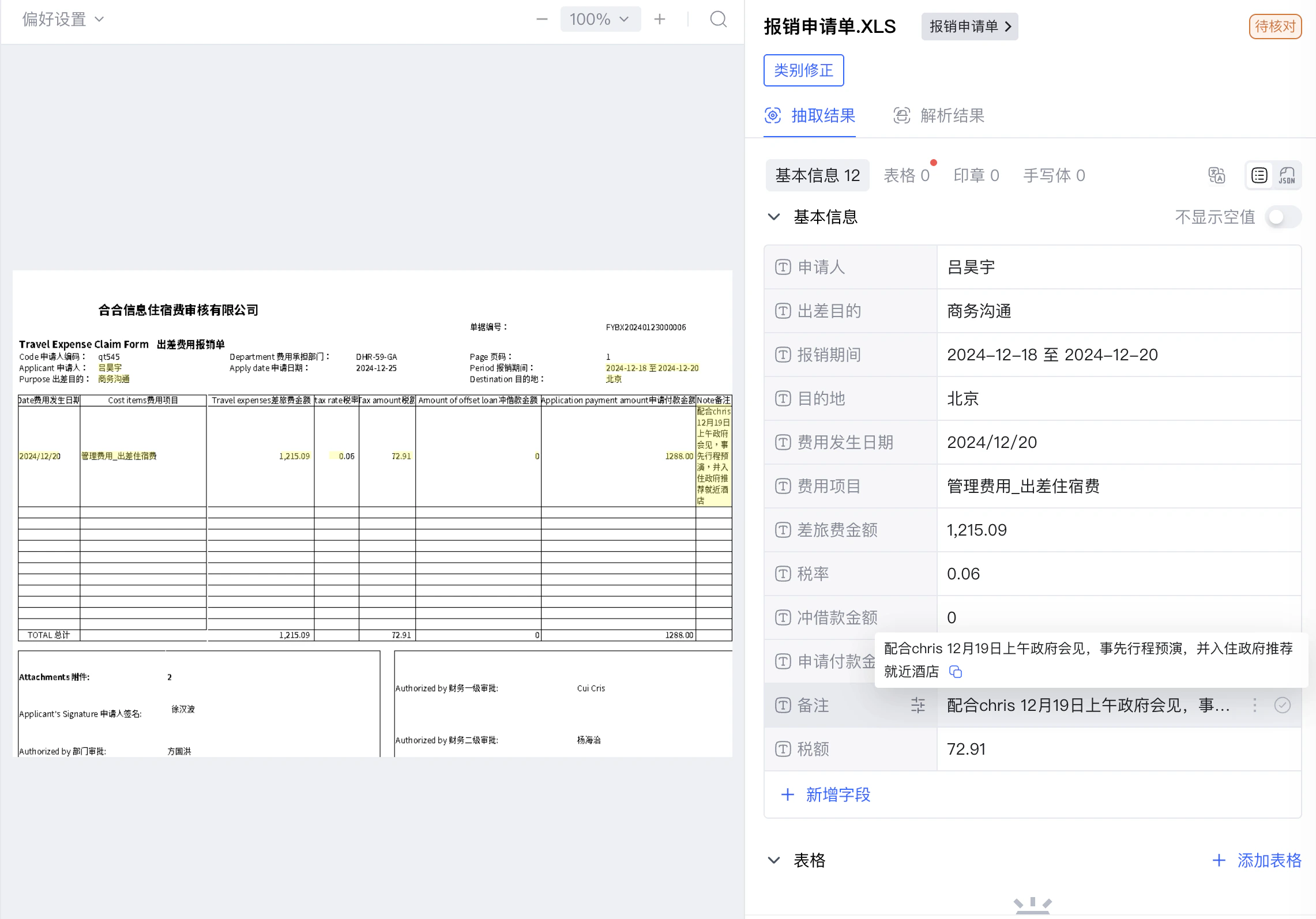
### 抽取结果示例
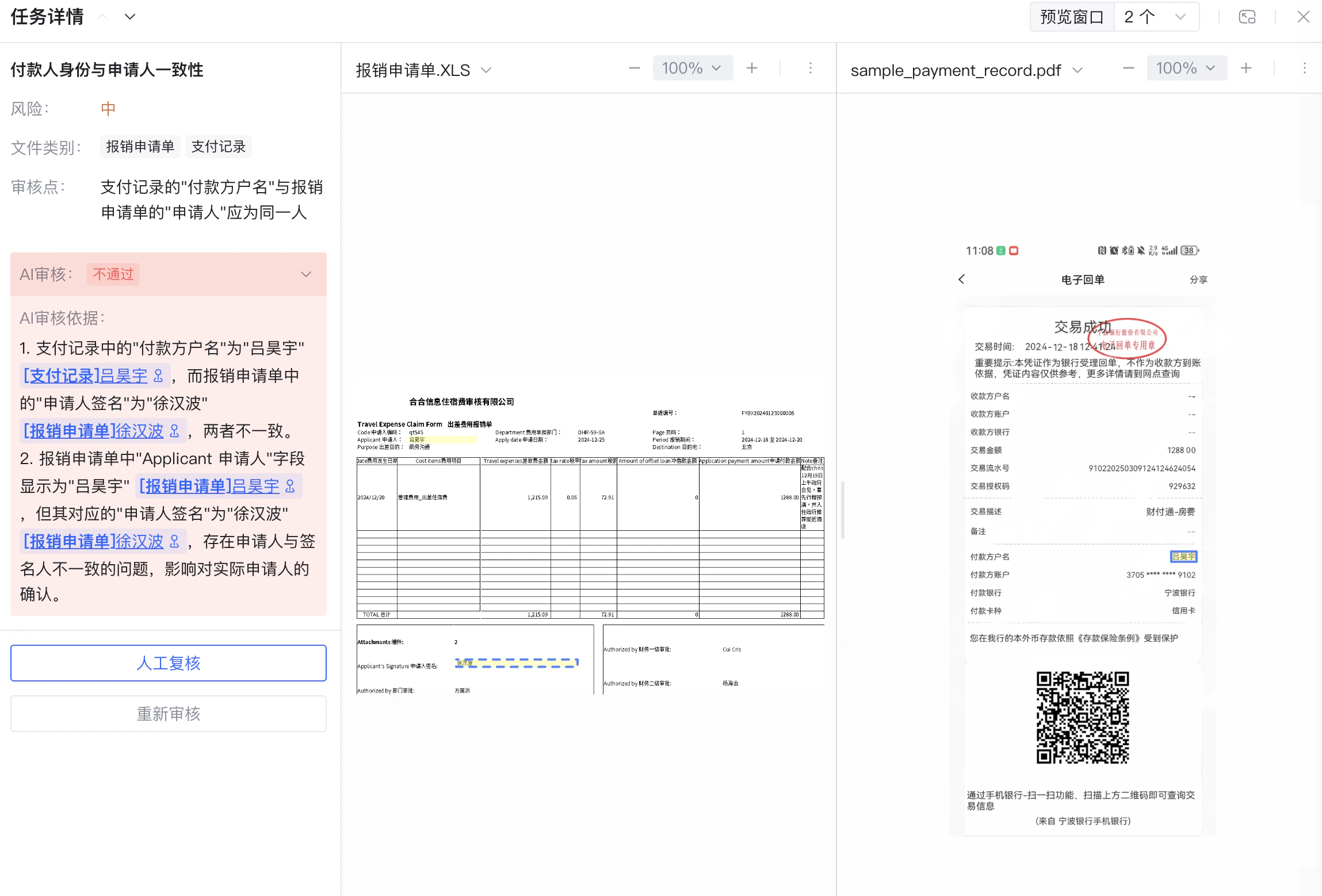
 ### 审核结果示例
 ## 04 完整示例代码
```python theme={null}
#!/usr/bin/env python3
# -*- coding: utf-8 -*-
"""
DocFlow 费用报销场景示例(已完成配置版)
适用于工作空间、文件类别、审核规则库已配置完毕的场景。
流程:
1. 上传待处理文件
2. 轮询获取抽取结果(分类识别 + 字段抽取)
3. 提交审核任务并获取审核结论
依赖:pip install requests
"""
import json
import os
import time
from datetime import datetime
import requests
# ============================================================
# 配置项 — 请替换为您的实际值
# ============================================================
APP_ID = "your-app-id" # TextIn 控制台中的 x-ti-app-id
SECRET_CODE = "your-secret-code" # TextIn 控制台中的 x-ti-secret-code
WORKSPACE_ID = "your-workspace-id" # 已创建的工作空间 ID
REPO_ID = "your-repo-id" # 已配置的审核规则库 ID
BASE_URL = "https://docflow.textin.com"
FILES_DIR = os.path.join(
os.path.dirname(os.path.abspath(__file__)),
"..", "sample_files", "expense_reimbursement"
)
# ============================================================
# 工具辅助函数
# ============================================================
def _headers() -> dict:
return {"x-ti-app-id": APP_ID, "x-ti-secret-code": SECRET_CODE}
def _check(resp: requests.Response, action: str) -> dict:
data = resp.json()
if data.get("code") != 200:
raise RuntimeError(f"{action} 失败(code={data.get('code')}): {data}")
return data
def _mime(file_path: str) -> str:
ext = os.path.splitext(file_path)[1].lower()
return {
".png": "image/png",
".jpg": "image/jpeg",
".jpeg": "image/jpeg",
".xls": "application/vnd.ms-excel",
".xlsx": "application/vnd.openxmlformats-officedocument.spreadsheetml.sheet",
".pdf": "application/pdf",
}.get(ext, "application/octet-stream")
def display_result(file_obj: dict) -> None:
"""格式化打印单个文件的分类与字段抽取结果。"""
name = file_obj.get("file_name", "")
cat = file_obj.get("category_name", "未识别")
fields = file_obj.get("fields", [])
tables = file_obj.get("tables", [])
print("=" * 60)
print(f"文件名 : {name}")
print(f"分类结果 : {cat}\n")
if fields:
print("── 普通字段 " + "─" * 30)
for f in fields:
print(f" {f['name']:<20}: {f.get('value', '')}")
for t in tables:
print(f"\n── 表格:{t.get('name', '')} " + "─" * 20)
rows = t.get("rows", [])
if rows:
headers = [c.get("name", "") for c in rows[0].get("cells", [])]
print(" " + " | ".join(f"{h:<12}" for h in headers))
print(" " + "-" * (15 * len(headers)))
for row in rows:
vals = [c.get("value", "") for c in row.get("cells", [])]
print(" " + " | ".join(f"{v:<12}" for v in vals))
print()
def display_review_result(result: dict) -> None:
"""格式化打印审核结论。"""
status_map = {1: "✅ 审核通过", 2: "❌ 审核失败", 4: "⚠️ 审核不通过", 7: "❌ 识别失败"}
print("=" * 60)
print(f" 审核结论:{status_map.get(result.get('status'), '未知')}")
stats = result.get("statistics", {})
print(f" 规则统计:通过 {stats.get('passed', 0)} 条 / "
f"不通过 {stats.get('failed', 0)} 条 / "
f"跳过 {stats.get('skipped', 0)} 条")
for group in result.get("groups", []):
print(f"\n 规则组:{group.get('name', '')}")
for rule in group.get("rules", []):
icon = "✅" if rule.get("status") == 1 else "⚠️ "
print(f" {icon} {rule.get('name', '')}")
if rule.get("message"):
print(f" → {rule['message']}")
print()
# ============================================================
# 步骤 1:上传待处理文件
# REST API: POST /api/app-api/sip/platform/v2/file/upload
# ============================================================
def upload_file(workspace_id: str, file_path: str) -> str:
url = f"{BASE_URL}/api/app-api/sip/platform/v2/file/upload"
with open(file_path, "rb") as f:
resp = requests.post(url,
params={"workspace_id": workspace_id},
files={"file": (os.path.basename(file_path), f, _mime(file_path))},
headers=_headers(), timeout=60)
batch_number = _check(resp, "上传文件")["result"]["batch_number"]
print(f"[步骤1] 文件上传成功 name={os.path.basename(file_path)}"
f" batch_number={batch_number}")
return batch_number
# ============================================================
# 步骤 2:轮询获取抽取结果
# REST API: GET /api/app-api/sip/platform/v2/file/fetch
# ============================================================
def wait_for_result(workspace_id: str, batch_number: str,
timeout: int = 120, interval: int = 3) -> dict:
url = f"{BASE_URL}/api/app-api/sip/platform/v2/file/fetch"
deadline = time.time() + timeout
print(f"[步骤2] 等待处理结果(batch_number={batch_number})", end="", flush=True)
while time.time() < deadline:
resp = requests.get(url,
params={"workspace_id": workspace_id, "batch_number": batch_number},
headers=_headers(), timeout=30)
files = _check(resp, "获取处理结果").get("result", {}).get("files", [])
if files:
status = files[0].get("recognition_status")
if status == 1:
print(" 完成")
return files[0]
elif status == 2:
raise RuntimeError(f"文件处理失败: {files[0].get('failure_causes')}")
print(".", end="", flush=True)
time.sleep(interval)
raise TimeoutError("等待超时")
# ============================================================
# 步骤 3:提交审核任务
# REST API: POST /api/app-api/sip/platform/v2/review/task/submit
# ============================================================
def submit_review_task(workspace_id: str, name: str,
repo_id: str, extract_task_ids: list) -> str:
url = f"{BASE_URL}/api/app-api/sip/platform/v2/review/task/submit"
payload = {
"workspace_id": workspace_id,
"name": name,
"repo_id": repo_id,
"extract_task_ids": extract_task_ids,
}
resp = requests.post(url, json=payload, headers=_headers(), timeout=30)
task_id = _check(resp, "提交审核任务")["result"]["task_id"]
print(f"[步骤3] 审核任务提交成功 task_id={task_id}")
return task_id
# ============================================================
# 步骤 4:轮询获取审核结果
# REST API: POST /api/app-api/sip/platform/v2/review/task/result
# ============================================================
def wait_for_review(workspace_id: str, task_id: str,
timeout: int = 300, interval: int = 5) -> dict:
url = f"{BASE_URL}/api/app-api/sip/platform/v2/review/task/result"
payload = {"workspace_id": workspace_id, "task_id": task_id}
deadline = time.time() + timeout
print(f"[步骤3] 等待审核结果(task_id={task_id})", end="", flush=True)
while time.time() < deadline:
resp = requests.post(url, json=payload, headers=_headers(), timeout=30)
result = _check(resp, "获取审核结果").get("result", {})
if result.get("status") in (1, 2, 4, 7):
print(" 完成")
return result
print(".", end="", flush=True)
time.sleep(interval)
raise TimeoutError("等待审核结果超时")
# ============================================================
# 主流程
# ============================================================
def main():
print("=" * 60)
print(" DocFlow 费用报销场景示例(已完成配置版)")
print("=" * 60)
print(f"工作空间: {WORKSPACE_ID}")
print(f"规则库: {REPO_ID}\n")
# 步骤 1:上传文件
print("开始上传待处理文件...")
file_paths = [
os.path.join(FILES_DIR, "sample_expense_form.xls"),
os.path.join(FILES_DIR, "sample_hotel_receipt.png"),
os.path.join(FILES_DIR, "sample_payment_record.pdf"),
]
batch_numbers = [upload_file(WORKSPACE_ID, p) for p in file_paths]
# 步骤 2:获取抽取结果
print("\n开始获取处理结果...")
raw_results = []
for batch_number in batch_numbers:
result = wait_for_result(WORKSPACE_ID, batch_number)
raw_results.append(result)
display_result(result)
# 步骤 3:提交审核任务
print("\n开始审核...")
task_name = f"费用报销审核_{datetime.now().strftime('%Y%m%d_%H%M%S')}"
extract_task_ids = [r.get("task_id") for r in raw_results if r.get("task_id")]
review_task_id = submit_review_task(WORKSPACE_ID, task_name, REPO_ID, extract_task_ids)
# 步骤 4:获取审核结果
review_result = wait_for_review(WORKSPACE_ID, review_task_id)
display_review_result(review_result)
if __name__ == "__main__":
main()
```
```java theme={null}
package com.docflow;
import com.google.gson.*;
import okhttp3.*;
import java.io.*;
import java.text.SimpleDateFormat;
import java.util.*;
/**
* DocFlow 费用报销场景示例(已完成配置版)
*
* 适用于工作空间、文件类别、审核规则库已配置完毕的场景。
* 流程:
* 1. 上传待处理文件
* 2. 轮询获取抽取结果(分类识别 + 字段抽取)
* 3. 提交审核任务并获取审核结论
*
* 依赖:okhttp3、gson(见 pom.xml)
*/
public class ExpenseReimbursementConfigured {
// ============================================================
// 配置项 — 请替换为您的实际值
// ============================================================
private static final String APP_ID = "your-app-id";
private static final String SECRET_CODE = "your-secret-code";
private static final String WORKSPACE_ID = "your-workspace-id";
private static final String REPO_ID = "your-repo-id";
private static final String BASE_URL = "https://docflow.textin.com";
private static final String FILES_DIR = "../sample_files/expense_reimbursement";
private static final OkHttpClient HTTP = new OkHttpClient.Builder()
.callTimeout(java.time.Duration.ofSeconds(60)).build();
private static final Gson GSON = new Gson();
private static final MediaType JSON_TYPE = MediaType.get("application/json; charset=utf-8");
// ============================================================
// 工具辅助方法
// ============================================================
private static Headers authHeaders() {
return new Headers.Builder()
.add("x-ti-app-id", APP_ID)
.add("x-ti-secret-code", SECRET_CODE)
.build();
}
private static JsonObject checkResponse(String body, String action) {
JsonObject obj = JsonParser.parseString(body).getAsJsonObject();
if (obj.get("code").getAsInt() != 200)
throw new RuntimeException(action + " 失败: " + body);
return obj;
}
private static String mimeType(String fileName) {
String ext = fileName.substring(fileName.lastIndexOf('.')).toLowerCase();
switch (ext) {
case ".png": return "image/png";
case ".jpg":
case ".jpeg": return "image/jpeg";
case ".xls": return "application/vnd.ms-excel";
case ".xlsx": return "application/vnd.openxmlformats-officedocument.spreadsheetml.sheet";
case ".pdf": return "application/pdf";
default: return "application/octet-stream";
}
}
// ============================================================
// 步骤 1:上传待处理文件
// ============================================================
public static String uploadFile(String workspaceId, String filePath) throws IOException {
File file = new File(filePath);
HttpUrl url = HttpUrl.parse(BASE_URL + "/api/app-api/sip/platform/v2/file/upload")
.newBuilder().addQueryParameter("workspace_id", workspaceId).build();
MultipartBody body = new MultipartBody.Builder().setType(MultipartBody.FORM)
.addFormDataPart("file", file.getName(),
RequestBody.create(file, MediaType.get(mimeType(file.getName()))))
.build();
Request req = new Request.Builder().url(url).headers(authHeaders()).post(body).build();
try (Response resp = HTTP.newCall(req).execute()) {
String batchNumber = checkResponse(resp.body().string(), "上传文件")
.getAsJsonObject("result").get("batch_number").getAsString();
System.out.println("[步骤1] 文件上传成功 name=" + file.getName()
+ " batch_number=" + batchNumber);
return batchNumber;
}
}
// ============================================================
// 步骤 2:轮询获取抽取结果
// ============================================================
public static JsonObject waitForResult(String workspaceId, String batchNumber,
int timeoutSec, int intervalSec) throws IOException, InterruptedException {
HttpUrl url = HttpUrl.parse(BASE_URL + "/api/app-api/sip/platform/v2/file/fetch")
.newBuilder().addQueryParameter("workspace_id", workspaceId)
.addQueryParameter("batch_number", batchNumber).build();
long deadline = System.currentTimeMillis() + (long) timeoutSec * 1000;
System.out.print("[步骤2] 等待处理结果(batch_number=" + batchNumber + ")");
while (System.currentTimeMillis() < deadline) {
Request req = new Request.Builder().url(url).headers(authHeaders()).get().build();
try (Response resp = HTTP.newCall(req).execute()) {
JsonObject data = checkResponse(resp.body().string(), "获取处理结果");
JsonArray files = data.getAsJsonObject("result").getAsJsonArray("files");
if (files != null && files.size() > 0) {
JsonObject file = files.get(0).getAsJsonObject();
int status = file.get("recognition_status").getAsInt();
if (status == 1) { System.out.println(" 完成"); return file; }
if (status == 2) throw new RuntimeException("文件处理失败");
}
}
System.out.print(".");
Thread.sleep((long) intervalSec * 1000);
}
throw new RuntimeException("等待超时");
}
// ============================================================
// 步骤 3:提交审核任务
// ============================================================
public static String submitReviewTask(String workspaceId, String name,
String repoId, List extractTaskIds) throws IOException {
JsonObject payload = new JsonObject();
payload.addProperty("workspace_id", workspaceId);
payload.addProperty("name", name);
payload.addProperty("repo_id", repoId);
JsonArray ids = new JsonArray();
extractTaskIds.forEach(ids::add);
payload.add("extract_task_ids", ids);
Request req = new Request.Builder()
.url(BASE_URL + "/api/app-api/sip/platform/v2/review/task/submit")
.headers(authHeaders())
.post(RequestBody.create(GSON.toJson(payload), JSON_TYPE)).build();
try (Response resp = HTTP.newCall(req).execute()) {
String taskId = checkResponse(resp.body().string(), "提交审核任务")
.getAsJsonObject("result").get("task_id").getAsString();
System.out.println("[步骤3] 审核任务提交成功 task_id=" + taskId);
return taskId;
}
}
// ============================================================
// 步骤 4:轮询获取审核结果
// ============================================================
public static JsonObject waitForReview(String workspaceId, String taskId,
int timeoutSec, int intervalSec) throws IOException, InterruptedException {
JsonObject payload = new JsonObject();
payload.addProperty("workspace_id", workspaceId);
payload.addProperty("task_id", taskId);
long deadline = System.currentTimeMillis() + (long) timeoutSec * 1000;
System.out.print("[步骤3] 等待审核结果(task_id=" + taskId + ")");
while (System.currentTimeMillis() < deadline) {
Request req = new Request.Builder()
.url(BASE_URL + "/api/app-api/sip/platform/v2/review/task/result")
.headers(authHeaders())
.post(RequestBody.create(GSON.toJson(payload), JSON_TYPE)).build();
try (Response resp = HTTP.newCall(req).execute()) {
JsonObject result = checkResponse(resp.body().string(), "获取审核结果")
.getAsJsonObject("result");
int status = result.get("status").getAsInt();
if (status == 1 || status == 2 || status == 4 || status == 7) {
System.out.println(" 完成");
return result;
}
}
System.out.print(".");
Thread.sleep((long) intervalSec * 1000);
}
throw new RuntimeException("等待审核结果超时");
}
// ============================================================
// 主流程
// ============================================================
public static void main(String[] args) throws Exception {
System.out.println("=".repeat(60));
System.out.println(" DocFlow 费用报销场景示例(已完成配置版)");
System.out.println("=".repeat(60));
System.out.println("工作空间: " + WORKSPACE_ID);
System.out.println("规则库: " + REPO_ID + "\n");
// 步骤 1:上传文件
System.out.println("开始上传待处理文件...");
String[] filePaths = {
FILES_DIR + "/sample_expense_form.xls",
FILES_DIR + "/sample_hotel_receipt.png",
FILES_DIR + "/sample_payment_record.pdf"
};
List batchNumbers = new ArrayList<>();
for (String path : filePaths) batchNumbers.add(uploadFile(WORKSPACE_ID, path));
// 步骤 2:获取抽取结果
System.out.println("\n开始获取处理结果...");
List rawResults = new ArrayList<>();
for (String bn : batchNumbers) {
rawResults.add(waitForResult(WORKSPACE_ID, bn, 120, 3));
}
// 步骤 3:提交审核任务
System.out.println("\n开始审核...");
String taskName = "费用报销审核_"
+ new SimpleDateFormat("yyyyMMdd_HHmmss").format(new Date());
List extractTaskIds = new ArrayList<>();
for (JsonObject r : rawResults) {
if (r.has("task_id")) extractTaskIds.add(r.get("task_id").getAsString());
}
String reviewTaskId = submitReviewTask(WORKSPACE_ID, taskName, REPO_ID, extractTaskIds);
// 步骤 4:获取审核结果
JsonObject reviewResult = waitForReview(WORKSPACE_ID, reviewTaskId, 300, 5);
System.out.println("\n审核完成,状态码: " + reviewResult.get("status").getAsInt());
}
}
```
## 05 完整示例代码下载
完整可运行代码(含 Python、Java 两个版本)已内置在文档仓库的 `examples/` 目录下:
```
examples/
├── python/
│ ├── expense_reimbursement_configured.py # Python 完整示例(已完成配置版)
│ ├── requirements.txt
│ └── README.md
├── java/
│ ├── src/main/java/com/docflow/
│ │ └── ExpenseReimbursementConfigured.java # Java 完整示例(已完成配置版)
│ ├── pom.xml
│ └── README.md
└── sample_files/
└── expense_reimbursement/
├── sample_expense_form.xls
├── sample_hotel_receipt.png
└── sample_payment_record.pdf
```
查看 Python 完整示例代码
查看 Java 完整示例代码
## 06 运行示例
**环境要求**:Python 3.8+
**1. 安装依赖**
```bash theme={null}
cd examples/python
pip install -r requirements.txt
```
**2. 填写配置**
打开 `expense_reimbursement_configured.py`,填写文件顶部的配置项:
```python theme={null}
APP_ID = "your-app-id" # x-ti-app-id
SECRET_CODE = "your-secret-code" # x-ti-secret-code
WORKSPACE_ID = "your-workspace-id" # 已创建的工作空间 ID
REPO_ID = "your-repo-id" # 已配置的审核规则库 ID
```
**3. 运行**
```bash theme={null}
python expense_reimbursement_configured.py
```
**环境要求**:JDK 11+,Maven 3.6+
**1. 填写配置**
打开 `src/main/java/com/docflow/ExpenseReimbursementConfigured.java`,填写文件顶部的配置项:
```java theme={null}
private static final String APP_ID = "your-app-id";
private static final String SECRET_CODE = "your-secret-code";
private static final String WORKSPACE_ID = "your-workspace-id";
private static final String REPO_ID = "your-repo-id";
```
**2. 编译并运行**
```bash theme={null}
cd examples/java
mvn clean package -q
java -jar target/expense-reimbursement-1.0.0.jar
```
运行成功后,可登录 [DocFlow Web 页面](https://docflow.textin.com/),在对应工作空间下直观查看每份文件的分类、字段抽取结果和智能审核结果,便于与代码输出对照验证。
### 预期控制台输出
```
============================================================
DocFlow 费用报销场景示例(已完成配置版)
============================================================
工作空间:
规则库:
开始上传待处理文件...
[步骤1] 文件上传成功 name=sample_expense_form.xls batch_number=
[步骤1] 文件上传成功 name=sample_hotel_receipt.png batch_number=
[步骤1] 文件上传成功 name=sample_payment_record.pdf batch_number=
开始获取处理结果...
[步骤2] 等待处理结果(batch_number=)..... 完成
============================================================
文件名 : sample_expense_form.xls
分类结果 : 报销申请单
── 普通字段 ──────────────────────────
申请人 : 吕昊宇
出差目的 : 商务沟通
报销期间 : 2024-12-18 至 2024-12-20
...
开始审核...
[步骤3] 审核任务提交成功 task_id=
[步骤3] 等待审核结果(task_id=).. 完成
============================================================
审核结论:⚠️ 审核不通过
规则统计:通过 6 条 / 不通过 2 条 / 跳过 0 条
规则组:报销申请单合规性检查
✅ 必填字段完整性校验
⚠️ 行报销金额校验
→ 第 2 行申请付款金额超出差旅费金额
...
```
## 07 结果说明
### 抽取结果
处理完成后,每份文件将返回分类结果和字段抽取结果。字段抽取结果位于 `data.fields[]`,每个字段包含 `key`、`value` 及坐标 `position`(可用于原文高亮回显)。
以下为三份样本文件的实际接口返回(来自 `file/fetch`,省略了部分 `position` 坐标):
```json theme={null}
{
"name": "sample_expense_form.xls",
"format": "xls",
"category": "报销申请单",
"recognition_status": 1,
"duration_ms": 5316,
"data": {
"fields": [
{ "key": "备注", "value": "配合chris 12月19日上午政府会见,事先行程预演,并入住政府推荐就近酒店" },
{ "key": "申请人", "value": "吕昊宇" },
{ "key": "出差目的", "value": "商务沟通" },
{ "key": "报销期间", "value": "2024-12-18 至 2024-12-20" },
{ "key": "税率", "value": "0.06" },
{ "key": "税额", "value": "30.06" }
],
"stamps": [],
"handwritings": []
}
}
```
```json theme={null}
{
"name": "sample_hotel_receipt.png",
"format": "png",
"category": "酒店水单",
"recognition_status": 1,
"duration_ms": 6185,
"data": {
"fields": [
{ "key": "总金额", "value": "1,288.00" },
{ "key": "入住日期", "value": "2024-12-18" },
{ "key": "离店日期", "value": "2024-12-20" }
],
"items": [
[
{ "key": "日期", "value": "2024-12-18" },
{ "key": "费用类型", "value": "房费*Room Charge" },
{ "key": "金额", "value": "644.00" }
],
[
{ "key": "日期", "value": "2024-12-19" },
{ "key": "费用类型", "value": "房费*Room Charge" },
{ "key": "金额", "value": "644.00" }
]
],
"stamps": [
{
"text": "北京中■马哥华罗大酒店有限 发票专用章",
"type": "其他",
"color": "红色",
"shape": "椭圆章"
}
],
"handwritings": []
}
}
```
```json theme={null}
{
"name": "sample_payment_record.pdf",
"format": "pdf",
"category": "支付记录",
"recognition_status": 1,
"duration_ms": 7203,
"data": {
"fields": [
{ "key": "交易描述", "value": "财付通-叶婆婆钵钵鸡" },
{ "key": "交易流水号", "value": "910220250309124124624054" },
{ "key": "交易时间", "value": "2025-03-09 12:41:24" },
{ "key": "交易金额", "value": "240.00" },
{ "key": "付款银行", "value": "宁波银行" },
{ "key": "交易账号/支付方式", "value": "信用卡" },
{ "key": "付款方户名", "value": "吕昊宇" }
],
"stamps": [
{
"text": "宁波银行股份有限公司 电子回单专用章",
"type": "其他",
"color": "红色",
"shape": "椭圆章"
}
],
"handwritings": []
}
}
```
### 审核结果
审核完成后,可从 `review/task/result` 接口获取以下信息:
* **`status`**:任务整体状态(`1`=审核通过,`4`=审核不通过,`2`=审核失败)
* **`statistics`**:规则通过数、不通过数汇总
* **`groups[].review_tasks[]`**:每条规则的详细审核结果,包含:
* `review_result`:该规则的审核结论
* `reasoning`:AI 给出的审核依据说明
* `anchors`:依据在原文中的坐标位置(可用于高亮回显)
```json theme={null}
{
"task_id": "31415926",
"task_name": "费用报销审核",
"status": 4,
"statistics": { "pass_count": 5, "failure_count": 3, "error_count": 0 },
"groups": [
{
"group_name": "报销申请单合规性检查",
"review_tasks": [
{
"rule_name": "必填字段完整性校验",
"risk_level": 10,
"review_result": 1,
"reasoning": "申请人、费用发生日期、费用项目、申请付款金额均已填写,审核通过。"
},
{
"rule_name": "行报销金额校验",
"risk_level": 10,
"review_result": 4,
"reasoning": "行申请付款金额 1288.00 大于行差旅费金额(含税)1215.09 + 税额 72.91 = 1288.00,等于上限,审核不通过。"
}
]
},
{
"group_name": "差旅费用政策匹配审核",
"review_tasks": [
{
"rule_name": "城市差标匹配",
"risk_level": 20,
"review_result": 1,
"reasoning": "酒店位于北京(一线城市),住宿单价 644.00 元/晚未超过 800 元/晚的标准,审核通过。"
}
]
},
{
"group_name": "跨文档交叉审核",
"review_tasks": [
{
"rule_name": "付款人身份与申请人一致性",
"risk_level": 20,
"review_result": 4,
"reasoning": "支付记录付款方户名"吕昊宇"与报销申请单申请人签名"徐汉波"不一致,审核不通过。"
}
]
}
]
}
```
## 04 完整示例代码
```python theme={null}
#!/usr/bin/env python3
# -*- coding: utf-8 -*-
"""
DocFlow 费用报销场景示例(已完成配置版)
适用于工作空间、文件类别、审核规则库已配置完毕的场景。
流程:
1. 上传待处理文件
2. 轮询获取抽取结果(分类识别 + 字段抽取)
3. 提交审核任务并获取审核结论
依赖:pip install requests
"""
import json
import os
import time
from datetime import datetime
import requests
# ============================================================
# 配置项 — 请替换为您的实际值
# ============================================================
APP_ID = "your-app-id" # TextIn 控制台中的 x-ti-app-id
SECRET_CODE = "your-secret-code" # TextIn 控制台中的 x-ti-secret-code
WORKSPACE_ID = "your-workspace-id" # 已创建的工作空间 ID
REPO_ID = "your-repo-id" # 已配置的审核规则库 ID
BASE_URL = "https://docflow.textin.com"
FILES_DIR = os.path.join(
os.path.dirname(os.path.abspath(__file__)),
"..", "sample_files", "expense_reimbursement"
)
# ============================================================
# 工具辅助函数
# ============================================================
def _headers() -> dict:
return {"x-ti-app-id": APP_ID, "x-ti-secret-code": SECRET_CODE}
def _check(resp: requests.Response, action: str) -> dict:
data = resp.json()
if data.get("code") != 200:
raise RuntimeError(f"{action} 失败(code={data.get('code')}): {data}")
return data
def _mime(file_path: str) -> str:
ext = os.path.splitext(file_path)[1].lower()
return {
".png": "image/png",
".jpg": "image/jpeg",
".jpeg": "image/jpeg",
".xls": "application/vnd.ms-excel",
".xlsx": "application/vnd.openxmlformats-officedocument.spreadsheetml.sheet",
".pdf": "application/pdf",
}.get(ext, "application/octet-stream")
def display_result(file_obj: dict) -> None:
"""格式化打印单个文件的分类与字段抽取结果。"""
name = file_obj.get("file_name", "")
cat = file_obj.get("category_name", "未识别")
fields = file_obj.get("fields", [])
tables = file_obj.get("tables", [])
print("=" * 60)
print(f"文件名 : {name}")
print(f"分类结果 : {cat}\n")
if fields:
print("── 普通字段 " + "─" * 30)
for f in fields:
print(f" {f['name']:<20}: {f.get('value', '')}")
for t in tables:
print(f"\n── 表格:{t.get('name', '')} " + "─" * 20)
rows = t.get("rows", [])
if rows:
headers = [c.get("name", "") for c in rows[0].get("cells", [])]
print(" " + " | ".join(f"{h:<12}" for h in headers))
print(" " + "-" * (15 * len(headers)))
for row in rows:
vals = [c.get("value", "") for c in row.get("cells", [])]
print(" " + " | ".join(f"{v:<12}" for v in vals))
print()
def display_review_result(result: dict) -> None:
"""格式化打印审核结论。"""
status_map = {1: "✅ 审核通过", 2: "❌ 审核失败", 4: "⚠️ 审核不通过", 7: "❌ 识别失败"}
print("=" * 60)
print(f" 审核结论:{status_map.get(result.get('status'), '未知')}")
stats = result.get("statistics", {})
print(f" 规则统计:通过 {stats.get('passed', 0)} 条 / "
f"不通过 {stats.get('failed', 0)} 条 / "
f"跳过 {stats.get('skipped', 0)} 条")
for group in result.get("groups", []):
print(f"\n 规则组:{group.get('name', '')}")
for rule in group.get("rules", []):
icon = "✅" if rule.get("status") == 1 else "⚠️ "
print(f" {icon} {rule.get('name', '')}")
if rule.get("message"):
print(f" → {rule['message']}")
print()
# ============================================================
# 步骤 1:上传待处理文件
# REST API: POST /api/app-api/sip/platform/v2/file/upload
# ============================================================
def upload_file(workspace_id: str, file_path: str) -> str:
url = f"{BASE_URL}/api/app-api/sip/platform/v2/file/upload"
with open(file_path, "rb") as f:
resp = requests.post(url,
params={"workspace_id": workspace_id},
files={"file": (os.path.basename(file_path), f, _mime(file_path))},
headers=_headers(), timeout=60)
batch_number = _check(resp, "上传文件")["result"]["batch_number"]
print(f"[步骤1] 文件上传成功 name={os.path.basename(file_path)}"
f" batch_number={batch_number}")
return batch_number
# ============================================================
# 步骤 2:轮询获取抽取结果
# REST API: GET /api/app-api/sip/platform/v2/file/fetch
# ============================================================
def wait_for_result(workspace_id: str, batch_number: str,
timeout: int = 120, interval: int = 3) -> dict:
url = f"{BASE_URL}/api/app-api/sip/platform/v2/file/fetch"
deadline = time.time() + timeout
print(f"[步骤2] 等待处理结果(batch_number={batch_number})", end="", flush=True)
while time.time() < deadline:
resp = requests.get(url,
params={"workspace_id": workspace_id, "batch_number": batch_number},
headers=_headers(), timeout=30)
files = _check(resp, "获取处理结果").get("result", {}).get("files", [])
if files:
status = files[0].get("recognition_status")
if status == 1:
print(" 完成")
return files[0]
elif status == 2:
raise RuntimeError(f"文件处理失败: {files[0].get('failure_causes')}")
print(".", end="", flush=True)
time.sleep(interval)
raise TimeoutError("等待超时")
# ============================================================
# 步骤 3:提交审核任务
# REST API: POST /api/app-api/sip/platform/v2/review/task/submit
# ============================================================
def submit_review_task(workspace_id: str, name: str,
repo_id: str, extract_task_ids: list) -> str:
url = f"{BASE_URL}/api/app-api/sip/platform/v2/review/task/submit"
payload = {
"workspace_id": workspace_id,
"name": name,
"repo_id": repo_id,
"extract_task_ids": extract_task_ids,
}
resp = requests.post(url, json=payload, headers=_headers(), timeout=30)
task_id = _check(resp, "提交审核任务")["result"]["task_id"]
print(f"[步骤3] 审核任务提交成功 task_id={task_id}")
return task_id
# ============================================================
# 步骤 4:轮询获取审核结果
# REST API: POST /api/app-api/sip/platform/v2/review/task/result
# ============================================================
def wait_for_review(workspace_id: str, task_id: str,
timeout: int = 300, interval: int = 5) -> dict:
url = f"{BASE_URL}/api/app-api/sip/platform/v2/review/task/result"
payload = {"workspace_id": workspace_id, "task_id": task_id}
deadline = time.time() + timeout
print(f"[步骤3] 等待审核结果(task_id={task_id})", end="", flush=True)
while time.time() < deadline:
resp = requests.post(url, json=payload, headers=_headers(), timeout=30)
result = _check(resp, "获取审核结果").get("result", {})
if result.get("status") in (1, 2, 4, 7):
print(" 完成")
return result
print(".", end="", flush=True)
time.sleep(interval)
raise TimeoutError("等待审核结果超时")
# ============================================================
# 主流程
# ============================================================
def main():
print("=" * 60)
print(" DocFlow 费用报销场景示例(已完成配置版)")
print("=" * 60)
print(f"工作空间: {WORKSPACE_ID}")
print(f"规则库: {REPO_ID}\n")
# 步骤 1:上传文件
print("开始上传待处理文件...")
file_paths = [
os.path.join(FILES_DIR, "sample_expense_form.xls"),
os.path.join(FILES_DIR, "sample_hotel_receipt.png"),
os.path.join(FILES_DIR, "sample_payment_record.pdf"),
]
batch_numbers = [upload_file(WORKSPACE_ID, p) for p in file_paths]
# 步骤 2:获取抽取结果
print("\n开始获取处理结果...")
raw_results = []
for batch_number in batch_numbers:
result = wait_for_result(WORKSPACE_ID, batch_number)
raw_results.append(result)
display_result(result)
# 步骤 3:提交审核任务
print("\n开始审核...")
task_name = f"费用报销审核_{datetime.now().strftime('%Y%m%d_%H%M%S')}"
extract_task_ids = [r.get("task_id") for r in raw_results if r.get("task_id")]
review_task_id = submit_review_task(WORKSPACE_ID, task_name, REPO_ID, extract_task_ids)
# 步骤 4:获取审核结果
review_result = wait_for_review(WORKSPACE_ID, review_task_id)
display_review_result(review_result)
if __name__ == "__main__":
main()
```
```java theme={null}
package com.docflow;
import com.google.gson.*;
import okhttp3.*;
import java.io.*;
import java.text.SimpleDateFormat;
import java.util.*;
/**
* DocFlow 费用报销场景示例(已完成配置版)
*
* 适用于工作空间、文件类别、审核规则库已配置完毕的场景。
* 流程:
* 1. 上传待处理文件
* 2. 轮询获取抽取结果(分类识别 + 字段抽取)
* 3. 提交审核任务并获取审核结论
*
* 依赖:okhttp3、gson(见 pom.xml)
*/
public class ExpenseReimbursementConfigured {
// ============================================================
// 配置项 — 请替换为您的实际值
// ============================================================
private static final String APP_ID = "your-app-id";
private static final String SECRET_CODE = "your-secret-code";
private static final String WORKSPACE_ID = "your-workspace-id";
private static final String REPO_ID = "your-repo-id";
private static final String BASE_URL = "https://docflow.textin.com";
private static final String FILES_DIR = "../sample_files/expense_reimbursement";
private static final OkHttpClient HTTP = new OkHttpClient.Builder()
.callTimeout(java.time.Duration.ofSeconds(60)).build();
private static final Gson GSON = new Gson();
private static final MediaType JSON_TYPE = MediaType.get("application/json; charset=utf-8");
// ============================================================
// 工具辅助方法
// ============================================================
private static Headers authHeaders() {
return new Headers.Builder()
.add("x-ti-app-id", APP_ID)
.add("x-ti-secret-code", SECRET_CODE)
.build();
}
private static JsonObject checkResponse(String body, String action) {
JsonObject obj = JsonParser.parseString(body).getAsJsonObject();
if (obj.get("code").getAsInt() != 200)
throw new RuntimeException(action + " 失败: " + body);
return obj;
}
private static String mimeType(String fileName) {
String ext = fileName.substring(fileName.lastIndexOf('.')).toLowerCase();
switch (ext) {
case ".png": return "image/png";
case ".jpg":
case ".jpeg": return "image/jpeg";
case ".xls": return "application/vnd.ms-excel";
case ".xlsx": return "application/vnd.openxmlformats-officedocument.spreadsheetml.sheet";
case ".pdf": return "application/pdf";
default: return "application/octet-stream";
}
}
// ============================================================
// 步骤 1:上传待处理文件
// ============================================================
public static String uploadFile(String workspaceId, String filePath) throws IOException {
File file = new File(filePath);
HttpUrl url = HttpUrl.parse(BASE_URL + "/api/app-api/sip/platform/v2/file/upload")
.newBuilder().addQueryParameter("workspace_id", workspaceId).build();
MultipartBody body = new MultipartBody.Builder().setType(MultipartBody.FORM)
.addFormDataPart("file", file.getName(),
RequestBody.create(file, MediaType.get(mimeType(file.getName()))))
.build();
Request req = new Request.Builder().url(url).headers(authHeaders()).post(body).build();
try (Response resp = HTTP.newCall(req).execute()) {
String batchNumber = checkResponse(resp.body().string(), "上传文件")
.getAsJsonObject("result").get("batch_number").getAsString();
System.out.println("[步骤1] 文件上传成功 name=" + file.getName()
+ " batch_number=" + batchNumber);
return batchNumber;
}
}
// ============================================================
// 步骤 2:轮询获取抽取结果
// ============================================================
public static JsonObject waitForResult(String workspaceId, String batchNumber,
int timeoutSec, int intervalSec) throws IOException, InterruptedException {
HttpUrl url = HttpUrl.parse(BASE_URL + "/api/app-api/sip/platform/v2/file/fetch")
.newBuilder().addQueryParameter("workspace_id", workspaceId)
.addQueryParameter("batch_number", batchNumber).build();
long deadline = System.currentTimeMillis() + (long) timeoutSec * 1000;
System.out.print("[步骤2] 等待处理结果(batch_number=" + batchNumber + ")");
while (System.currentTimeMillis() < deadline) {
Request req = new Request.Builder().url(url).headers(authHeaders()).get().build();
try (Response resp = HTTP.newCall(req).execute()) {
JsonObject data = checkResponse(resp.body().string(), "获取处理结果");
JsonArray files = data.getAsJsonObject("result").getAsJsonArray("files");
if (files != null && files.size() > 0) {
JsonObject file = files.get(0).getAsJsonObject();
int status = file.get("recognition_status").getAsInt();
if (status == 1) { System.out.println(" 完成"); return file; }
if (status == 2) throw new RuntimeException("文件处理失败");
}
}
System.out.print(".");
Thread.sleep((long) intervalSec * 1000);
}
throw new RuntimeException("等待超时");
}
// ============================================================
// 步骤 3:提交审核任务
// ============================================================
public static String submitReviewTask(String workspaceId, String name,
String repoId, List extractTaskIds) throws IOException {
JsonObject payload = new JsonObject();
payload.addProperty("workspace_id", workspaceId);
payload.addProperty("name", name);
payload.addProperty("repo_id", repoId);
JsonArray ids = new JsonArray();
extractTaskIds.forEach(ids::add);
payload.add("extract_task_ids", ids);
Request req = new Request.Builder()
.url(BASE_URL + "/api/app-api/sip/platform/v2/review/task/submit")
.headers(authHeaders())
.post(RequestBody.create(GSON.toJson(payload), JSON_TYPE)).build();
try (Response resp = HTTP.newCall(req).execute()) {
String taskId = checkResponse(resp.body().string(), "提交审核任务")
.getAsJsonObject("result").get("task_id").getAsString();
System.out.println("[步骤3] 审核任务提交成功 task_id=" + taskId);
return taskId;
}
}
// ============================================================
// 步骤 4:轮询获取审核结果
// ============================================================
public static JsonObject waitForReview(String workspaceId, String taskId,
int timeoutSec, int intervalSec) throws IOException, InterruptedException {
JsonObject payload = new JsonObject();
payload.addProperty("workspace_id", workspaceId);
payload.addProperty("task_id", taskId);
long deadline = System.currentTimeMillis() + (long) timeoutSec * 1000;
System.out.print("[步骤3] 等待审核结果(task_id=" + taskId + ")");
while (System.currentTimeMillis() < deadline) {
Request req = new Request.Builder()
.url(BASE_URL + "/api/app-api/sip/platform/v2/review/task/result")
.headers(authHeaders())
.post(RequestBody.create(GSON.toJson(payload), JSON_TYPE)).build();
try (Response resp = HTTP.newCall(req).execute()) {
JsonObject result = checkResponse(resp.body().string(), "获取审核结果")
.getAsJsonObject("result");
int status = result.get("status").getAsInt();
if (status == 1 || status == 2 || status == 4 || status == 7) {
System.out.println(" 完成");
return result;
}
}
System.out.print(".");
Thread.sleep((long) intervalSec * 1000);
}
throw new RuntimeException("等待审核结果超时");
}
// ============================================================
// 主流程
// ============================================================
public static void main(String[] args) throws Exception {
System.out.println("=".repeat(60));
System.out.println(" DocFlow 费用报销场景示例(已完成配置版)");
System.out.println("=".repeat(60));
System.out.println("工作空间: " + WORKSPACE_ID);
System.out.println("规则库: " + REPO_ID + "\n");
// 步骤 1:上传文件
System.out.println("开始上传待处理文件...");
String[] filePaths = {
FILES_DIR + "/sample_expense_form.xls",
FILES_DIR + "/sample_hotel_receipt.png",
FILES_DIR + "/sample_payment_record.pdf"
};
List batchNumbers = new ArrayList<>();
for (String path : filePaths) batchNumbers.add(uploadFile(WORKSPACE_ID, path));
// 步骤 2:获取抽取结果
System.out.println("\n开始获取处理结果...");
List rawResults = new ArrayList<>();
for (String bn : batchNumbers) {
rawResults.add(waitForResult(WORKSPACE_ID, bn, 120, 3));
}
// 步骤 3:提交审核任务
System.out.println("\n开始审核...");
String taskName = "费用报销审核_"
+ new SimpleDateFormat("yyyyMMdd_HHmmss").format(new Date());
List extractTaskIds = new ArrayList<>();
for (JsonObject r : rawResults) {
if (r.has("task_id")) extractTaskIds.add(r.get("task_id").getAsString());
}
String reviewTaskId = submitReviewTask(WORKSPACE_ID, taskName, REPO_ID, extractTaskIds);
// 步骤 4:获取审核结果
JsonObject reviewResult = waitForReview(WORKSPACE_ID, reviewTaskId, 300, 5);
System.out.println("\n审核完成,状态码: " + reviewResult.get("status").getAsInt());
}
}
```
## 05 完整示例代码下载
完整可运行代码(含 Python、Java 两个版本)已内置在文档仓库的 `examples/` 目录下:
```
examples/
├── python/
│ ├── expense_reimbursement_configured.py # Python 完整示例(已完成配置版)
│ ├── requirements.txt
│ └── README.md
├── java/
│ ├── src/main/java/com/docflow/
│ │ └── ExpenseReimbursementConfigured.java # Java 完整示例(已完成配置版)
│ ├── pom.xml
│ └── README.md
└── sample_files/
└── expense_reimbursement/
├── sample_expense_form.xls
├── sample_hotel_receipt.png
└── sample_payment_record.pdf
```
查看 Python 完整示例代码
查看 Java 完整示例代码
## 06 运行示例
**环境要求**:Python 3.8+
**1. 安装依赖**
```bash theme={null}
cd examples/python
pip install -r requirements.txt
```
**2. 填写配置**
打开 `expense_reimbursement_configured.py`,填写文件顶部的配置项:
```python theme={null}
APP_ID = "your-app-id" # x-ti-app-id
SECRET_CODE = "your-secret-code" # x-ti-secret-code
WORKSPACE_ID = "your-workspace-id" # 已创建的工作空间 ID
REPO_ID = "your-repo-id" # 已配置的审核规则库 ID
```
**3. 运行**
```bash theme={null}
python expense_reimbursement_configured.py
```
**环境要求**:JDK 11+,Maven 3.6+
**1. 填写配置**
打开 `src/main/java/com/docflow/ExpenseReimbursementConfigured.java`,填写文件顶部的配置项:
```java theme={null}
private static final String APP_ID = "your-app-id";
private static final String SECRET_CODE = "your-secret-code";
private static final String WORKSPACE_ID = "your-workspace-id";
private static final String REPO_ID = "your-repo-id";
```
**2. 编译并运行**
```bash theme={null}
cd examples/java
mvn clean package -q
java -jar target/expense-reimbursement-1.0.0.jar
```
运行成功后,可登录 [DocFlow Web 页面](https://docflow.textin.com/),在对应工作空间下直观查看每份文件的分类、字段抽取结果和智能审核结果,便于与代码输出对照验证。
### 预期控制台输出
```
============================================================
DocFlow 费用报销场景示例(已完成配置版)
============================================================
工作空间:
规则库:
开始上传待处理文件...
[步骤1] 文件上传成功 name=sample_expense_form.xls batch_number=
[步骤1] 文件上传成功 name=sample_hotel_receipt.png batch_number=
[步骤1] 文件上传成功 name=sample_payment_record.pdf batch_number=
开始获取处理结果...
[步骤2] 等待处理结果(batch_number=)..... 完成
============================================================
文件名 : sample_expense_form.xls
分类结果 : 报销申请单
── 普通字段 ──────────────────────────
申请人 : 吕昊宇
出差目的 : 商务沟通
报销期间 : 2024-12-18 至 2024-12-20
...
开始审核...
[步骤3] 审核任务提交成功 task_id=
[步骤3] 等待审核结果(task_id=).. 完成
============================================================
审核结论:⚠️ 审核不通过
规则统计:通过 6 条 / 不通过 2 条 / 跳过 0 条
规则组:报销申请单合规性检查
✅ 必填字段完整性校验
⚠️ 行报销金额校验
→ 第 2 行申请付款金额超出差旅费金额
...
```
## 07 结果说明
### 抽取结果
处理完成后,每份文件将返回分类结果和字段抽取结果。字段抽取结果位于 `data.fields[]`,每个字段包含 `key`、`value` 及坐标 `position`(可用于原文高亮回显)。
以下为三份样本文件的实际接口返回(来自 `file/fetch`,省略了部分 `position` 坐标):
```json theme={null}
{
"name": "sample_expense_form.xls",
"format": "xls",
"category": "报销申请单",
"recognition_status": 1,
"duration_ms": 5316,
"data": {
"fields": [
{ "key": "备注", "value": "配合chris 12月19日上午政府会见,事先行程预演,并入住政府推荐就近酒店" },
{ "key": "申请人", "value": "吕昊宇" },
{ "key": "出差目的", "value": "商务沟通" },
{ "key": "报销期间", "value": "2024-12-18 至 2024-12-20" },
{ "key": "税率", "value": "0.06" },
{ "key": "税额", "value": "30.06" }
],
"stamps": [],
"handwritings": []
}
}
```
```json theme={null}
{
"name": "sample_hotel_receipt.png",
"format": "png",
"category": "酒店水单",
"recognition_status": 1,
"duration_ms": 6185,
"data": {
"fields": [
{ "key": "总金额", "value": "1,288.00" },
{ "key": "入住日期", "value": "2024-12-18" },
{ "key": "离店日期", "value": "2024-12-20" }
],
"items": [
[
{ "key": "日期", "value": "2024-12-18" },
{ "key": "费用类型", "value": "房费*Room Charge" },
{ "key": "金额", "value": "644.00" }
],
[
{ "key": "日期", "value": "2024-12-19" },
{ "key": "费用类型", "value": "房费*Room Charge" },
{ "key": "金额", "value": "644.00" }
]
],
"stamps": [
{
"text": "北京中■马哥华罗大酒店有限 发票专用章",
"type": "其他",
"color": "红色",
"shape": "椭圆章"
}
],
"handwritings": []
}
}
```
```json theme={null}
{
"name": "sample_payment_record.pdf",
"format": "pdf",
"category": "支付记录",
"recognition_status": 1,
"duration_ms": 7203,
"data": {
"fields": [
{ "key": "交易描述", "value": "财付通-叶婆婆钵钵鸡" },
{ "key": "交易流水号", "value": "910220250309124124624054" },
{ "key": "交易时间", "value": "2025-03-09 12:41:24" },
{ "key": "交易金额", "value": "240.00" },
{ "key": "付款银行", "value": "宁波银行" },
{ "key": "交易账号/支付方式", "value": "信用卡" },
{ "key": "付款方户名", "value": "吕昊宇" }
],
"stamps": [
{
"text": "宁波银行股份有限公司 电子回单专用章",
"type": "其他",
"color": "红色",
"shape": "椭圆章"
}
],
"handwritings": []
}
}
```
### 审核结果
审核完成后,可从 `review/task/result` 接口获取以下信息:
* **`status`**:任务整体状态(`1`=审核通过,`4`=审核不通过,`2`=审核失败)
* **`statistics`**:规则通过数、不通过数汇总
* **`groups[].review_tasks[]`**:每条规则的详细审核结果,包含:
* `review_result`:该规则的审核结论
* `reasoning`:AI 给出的审核依据说明
* `anchors`:依据在原文中的坐标位置(可用于高亮回显)
```json theme={null}
{
"task_id": "31415926",
"task_name": "费用报销审核",
"status": 4,
"statistics": { "pass_count": 5, "failure_count": 3, "error_count": 0 },
"groups": [
{
"group_name": "报销申请单合规性检查",
"review_tasks": [
{
"rule_name": "必填字段完整性校验",
"risk_level": 10,
"review_result": 1,
"reasoning": "申请人、费用发生日期、费用项目、申请付款金额均已填写,审核通过。"
},
{
"rule_name": "行报销金额校验",
"risk_level": 10,
"review_result": 4,
"reasoning": "行申请付款金额 1288.00 大于行差旅费金额(含税)1215.09 + 税额 72.91 = 1288.00,等于上限,审核不通过。"
}
]
},
{
"group_name": "差旅费用政策匹配审核",
"review_tasks": [
{
"rule_name": "城市差标匹配",
"risk_level": 20,
"review_result": 1,
"reasoning": "酒店位于北京(一线城市),住宿单价 644.00 元/晚未超过 800 元/晚的标准,审核通过。"
}
]
},
{
"group_name": "跨文档交叉审核",
"review_tasks": [
{
"rule_name": "付款人身份与申请人一致性",
"risk_level": 20,
"review_result": 4,
"reasoning": "支付记录付款方户名"吕昊宇"与报销申请单申请人签名"徐汉波"不一致,审核不通过。"
}
]
}
]
}
```